Browserscan: A Complete Guide to Browser Fingerprint Detection
The core takeaways:
- Browserscan tests over a dozen fingerprint signals simultaneously, including proxy detection, WebRTC leaks, automation indicators, and timezone consistency
- Passing Browserscan requires more than just routing traffic through a proxy — the full browser environment needs to be coherent
- Residential proxies, especially dynamic ones, are far less likely to be flagged than datacenter alternatives
- Browserscan is one validation layer, not a complete anonymity solution — behavioral signals matter too
If your current setup keeps getting flagged or blocked, run it through Browserscan first. The report will usually point directly at the problem. Fix the signals it reveals, pair the setup with a quality residential proxy network, and you'll be starting from a much stronger baseline — one that can actually hold up against modern detection systems.
Every time you open a browser, it broadcasts a surprising amount of information about itself — your screen size, installed fonts, GPU model, timezone, language settings, and dozens of other data points. Websites collect all of this silently. Browserscan is one of the most thorough tools available for seeing exactly what your browser reveals — and for testing whether your anonymity setup actually holds up. Whether you're a developer, privacy researcher, or proxy user, understanding what Browserscan shows you is the first step toward building a genuinely clean digital identity.
What Is Browserscan?
Browserscan is a browser fingerprint detection and analysis tool available at browserscan.net. It examines your browser environment in real time and presents a detailed breakdown of the signals your browser is leaking to the outside world.
Unlike simpler "what's my IP" tools, Browserscan goes several layers deeper. It doesn't just check your IP address — it checks whether your browser's reported timezone matches your IP's geolocation, whether WebRTC is leaking your real IP, whether your Canvas and WebGL fingerprints are consistent, and whether the environment looks like a real user or an automated script.
The tool is widely used by:
- Developers testing automation and scraping setups
- Privacy-conscious users verifying their anonymity tools
- Marketers and multi-account operators checking anti-detect browser configurations
- Security researchers studying fingerprinting techniques
- Proxy users confirming that their proxy setup is actually working
How Browserscan Detects Browser Fingerprints
Browser fingerprinting is the practice of collecting multiple browser and device attributes to create a unique identifier — without using cookies. Even if you clear your cookies, your fingerprint often stays the same.
Browserscan works by running a battery of JavaScript-based tests in your browser. Each test probes a different signal:
Canvas Fingerprinting: Your browser renders a hidden image using the HTML Canvas API. Subtle differences in how your GPU and browser render that image create a near-unique hash. Browserscan captures this and compares it against known patterns.
WebGL Fingerprinting: Similar to Canvas, WebGL tests reveal your graphics card model and driver version by rendering 3D graphics. This information is consistent across sessions and very hard to fake convincingly.
WebRTC Leak Detection: WebRTC is a browser feature for real-time communication. A well-known flaw is that it can expose your real IP address even when you're connected through a proxy or VPN. Browserscan tests for this directly.
Navigator and System Properties: Your browser's navigator object exposes your operating system, browser version, language settings, number of CPU cores, and installed plugins. If any of these don't match what's expected for your claimed location or device, it's a red flag.
Timezone and Geolocation Consistency: One of the most common mistakes proxy users make: their IP says they're in New York, but their browser timezone is set to Asia/Shanghai. Browserscan checks whether these values align — because inconsistency is a primary signal anti-bot systems use.
Automation Detection: Browserscan checks for signals that indicate the browser is being driven by automation tools like Selenium, Playwright, or Puppeteer. These include the navigator.webdriver property, modified browser APIs, and headless browser fingerprints.
What Information Browserscan Reveals About Your Browser
When you visit Browserscan, here's what the report covers:
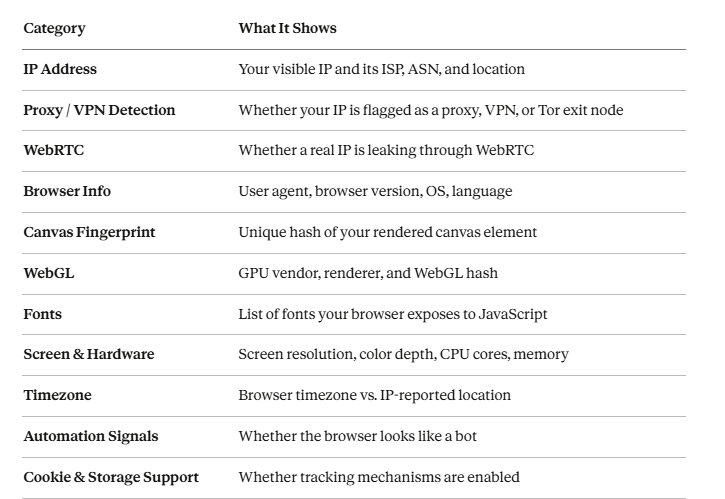
Each of these signals contributes to your overall fingerprint. Browserscan presents them clearly so you can see exactly which ones are inconsistent or potentially leaking.
Common Use Cases for Browserscan
1. Testing Your Browser Fingerprint for Uniqueness
If you're concerned about being tracked across websites, Browserscan helps you understand how unique your browser fingerprint is. A highly unique fingerprint makes you easier to track even without cookies. You can use this information to decide what changes to make to your browser or setup.
2. Verifying That Your Proxy Is Working Correctly
Many proxy users assume their proxy is working because traffic routes through it — but Browserscan often reveals problems they didn't know existed. A WebRTC leak might still expose your home IP. Your timezone might not match your proxy's location. These are the kinds of errors that can blow your cover on sophisticated platforms.
3. Configuring Anti-Detect Browsers
Anti-detect browsers like Multilogin, AdsPower, and Dolphin Anty let you create browser profiles with custom fingerprints. Browserscan is the standard tool for verifying that these profiles are configured correctly — that the reported OS, timezone, Canvas hash, and WebGL data all tell a consistent story.
4. Automation and Scraping Environment Testing
When you build a scraper using Playwright, Puppeteer, or Selenium, the resulting browser environment is subtly different from a real user's browser. Browserscan reveals which automation signals are present so you can patch them before deploying. Running your headless browser through Browserscan before going live is a standard quality check in professional scraping workflows.
5. Anonymity Research and Security Audits
Security researchers and privacy advocates use Browserscan to study what websites can learn about visitors passively. Understanding the attack surface is the prerequisite for reducing it.
Browserscan vs Other Browser Fingerprint Testing Tools
Browserscan isn't the only fingerprint testing tool available. Here's how it compares to the most popular alternatives:

Where Browserscan stands out: Its combination of proxy and VPN detection, automation signal testing, and timezone consistency checks makes it particularly useful for proxy users and developers — not just privacy-focused individuals.
How to Use Browserscan with Proxies
Using Browserscan as a proxy verification tool is one of its most practical applications. Here's a step-by-step approach:
Step 1: Configure Your Proxy
Set up your proxy in your browser, scraping tool, or anti-detect browser profile. Make sure you've set the correct country or city and configured session mode (rotating or sticky).
Step 2: Set Your Browser Timezone to Match
This is the step most people skip. If your proxy IP is in London, your browser timezone must also be set to Europe/London. Browserscan will immediately flag a mismatch as a consistency failure.
Step 3: Open Browserscan in the Proxied Environment
Navigate to browserscan.net through your configured proxy or anti-detect browser profile. Let the full scan run.
Step 4: Review the Results Systematically
Check these in order:
- IP location — Is it showing the proxy's country, not yours?
- WebRTC — Is your real IP leaking? If yes, disable WebRTC in your browser settings or extensions.
- Timezone consistency — Does the timezone match the IP location?
- Automation signals — Is navigator.webdriver exposed? If you're using Playwright or Puppeteer, patch this.
- Canvas / WebGL — For anti-detect browser setups, verify these are producing consistent (but not identical) hashes.
Step 5: Fix Issues and Re-Test
Browserscan is most useful when you treat it iteratively. Fix one signal at a time and re-run the scan until your profile passes all checks.
Why Residential Proxies Help Improve Anonymity
Not all proxies perform equally when run through tools like Browserscan — and the gap becomes obvious immediately.
- Residential proxies by contrast, use IP addresses assigned by real ISPs to real homes. They carry legitimate ISP attribution, don't appear in proxy blacklists, and look like genuine user traffic — because they originate from genuine user infrastructure.
- Dynamic residential proxies take this further: because the IPs naturally change as home users reconnect, they're even harder to fingerprint and block over time. For any workflow where Browserscan results actually matter — multi-account management, ad verification, geo-restricted content access, or high-volume scraping — residential IPs are the standard.
IPOasis is built specifically around this model. Their dynamic residential proxy network routes your traffic through real ISP-assigned IPs across global locations, with granular geo-targeting down to city level. Running an IPOasis residential proxy through Browserscan, you'll typically see the IP classified as a legitimate ISP address rather than flagged as a datacenter or known proxy — which is the baseline you need for any serious anonymity or automation setup.
For teams that have tried datacenter proxies and kept getting flagged, switching to a dynamic residential network is usually the fix that makes everything else work.
Limitations of Browser Fingerprint Testing Tools
Browserscan is genuinely useful — but it's important to understand what it doesn't tell you.
- It's a snapshot, not a guarantee: Passing Browserscan doesn't mean you'll pass every website's anti-bot system. Platforms like Cloudflare, Akamai, and Kasada use behavioral analysis, mouse movement patterns, keystroke timing, and historical IP reputation — none of which Browserscan tests.
- Detection databases change: Whether your proxy IP is flagged depends on which database Browserscan is checking against at that moment. An IP that passes today may be flagged tomorrow if it appears in a newly updated blocklist.
- Fingerprint patching is an arms race: Anti-detect browsers work by overriding JavaScript APIs. But sites increasingly check whether those overrides look real or whether they're obviously spoofed. A Canvas fingerprint that's too "clean" or too "random" can itself be a signal.
- It doesn't test behavioral signals: Browserscan tells you about your technical fingerprint — not how your browsing behavior looks. Even with a perfect fingerprint, automated or erratic behavior will trigger detection on sophisticated platforms.
Use Browserscan as one layer of your validation process, not the entire process.
Frequently Asked Questions
Is Browserscan accurate?
Browserscan is highly accurate for the signals it tests — IP classification, WebRTC leaks, browser environment properties, and automation indicators. It draws on well-established fingerprinting techniques and up-to-date proxy detection databases. That said, no single tool covers every detection vector, and results can vary depending on how frequently its databases are updated.
Can Browserscan detect proxies?
Yes. Browserscan checks your IP against proxy and VPN detection databases and identifies whether it belongs to a datacenter, hosting provider, or known proxy network. Residential proxy IPs typically pass this check because they're associated with real ISPs rather than commercial hosting infrastructure.
How do I hide my browser fingerprint?
Completely hiding your fingerprint is difficult. The most effective approaches are: using an anti-detect browser (like AdsPower) to create consistent but unique profiles, pairing each profile with a residential proxy whose location matches the profile's timezone and language settings, and disabling WebRTC to prevent IP leaks. Tools like Browserscan help you verify whether these measures are working.
Pro Tip from AdsPower:
To supercharge your fingerprint management and ensure seamless profile isolation, consider using AdsPower. Their robust anti-detect technology guarantees that each of your browser profiles remains completely unique and untraceable, a critical safeguard for any online operation.

Here's a clear breakdown of their limited-time offers:
- 360-Day Plan: Get 360 bonus days (Total 720 days access)
- 180-Day Plan: Get 90 bonus days (Total 270 days access)
- 90-Day Plan: Get 30 bonus days (Total 120 days access)
Sign up today to secure the best deal and maximize your privacy protection.
What tools are similar to Browserscan?
The closest alternatives are BrowserLeaks (comprehensive leak testing), Pixelscan (popular in the anti-detect community), IPLeak (focused on WebRTC and DNS leaks), and CreepJS (very detailed entropy analysis). Browserscan is distinguished by its combination of proxy detection, automation signal testing, and timezone consistency checking in a single report.
Are fingerprint tests enough to guarantee anonymity?
No. Browser fingerprint tests like Browserscan check your technical signals — IP classification, browser properties, and hardware attributes. But full anonymity also depends on behavioral patterns, request timing, historical IP reputation, and platform-specific detection logic. Think of fingerprint testing as necessary but not sufficient: if you fail it, you're definitely detectable; if you pass it, you've cleared one important hurdle but not all of them.
Conclusion
Browserscan is one of the most useful tools in the proxy and privacy toolkit — not because it makes you anonymous, but because it shows you precisely where you're not. The gap between "I have a proxy running" and "my proxy setup actually looks like a real user" is often large, and Browserscan is the fastest way to measure it.