Twitter Video Tools: The Complete Guide
Twitter — now rebranded as X — remains one of the most video-heavy social platforms on the internet. Whether you're a marketer tracking competitor content, a researcher building a video dataset, a developer automating social workflows, or simply someone who wants to save a clip for offline viewing, you've likely gone looking for Twitter video tools at some point. The problem is that most guides either list basic downloaders without context, or jump straight into technical scraping tutorials that leave beginners behind.
This guide covers the full picture: what these tools are, what types exist, which ones are worth using in 2026, and how professionals set up complete workflows — including where proxies fit in for high-volume data collection and automation tasks.
What Are Twitter Video Tools?
Twitter video tools are any software, web application, browser extension, or API-based solution that helps you interact with video content on Twitter/X beyond what the native platform allows.
That covers a wide range of use cases: saving a video to your phone, pulling engagement metrics on a competitor's video campaign, scheduling your own video posts for optimal timing, or programmatically collecting thousands of video URLs for research purposes.
The native Twitter/X app lets you watch and share videos — but it deliberately limits everything else. You can't download natively, the analytics are thin for non-premium users, and there are no bulk data tools built in. That gap is exactly why the third-party tool ecosystem around Twitter video has grown so large.
Common Types of Twitter Video Tools
Not all Twitter video tools do the same thing. Before picking one, it helps to know which category fits your actual need.
Twitter Video Downloader Tools
These are the most searched tools in this space. They let you save videos from tweets to your local device, either through a web interface (paste the tweet URL, click download) or a browser extension that adds a download button directly to your feed. Most are free and require no account. Examples include SaveTweetVid, TWSave, and the browser extension SSS Twitter Video Downloader.
Twitter Video Analytics Tools
These tools go beyond native X analytics to give you deeper performance data: view counts over time, audience retention patterns, engagement rate benchmarks, and competitor video analysis. Tools like Brandwatch, Sprout Social, and Socialinsider fall into this category. They're primarily used by social media managers and marketing teams.
Social Media Management Tools with Video Support
Platforms like Buffer, Hootsuite, and Later allow you to schedule and publish video content to Twitter/X alongside other platforms. They also provide post-level analytics and team collaboration features, making them useful for brands managing content at scale.
Content Repurposing and Editing Tools
These tools help you take Twitter videos and reformat them for other platforms — trimming length, adding subtitles, resizing for vertical video formats, or extracting audio. Tools like Kapwing and Clideo are commonly used for this kind of lightweight editing without a full desktop video editor.
API-Based Data Collection Tools
For developers and researchers, tools that wrap the Twitter/X API — or scrape public data programmatically — allow bulk collection of tweet metadata including video URLs, engagement counts, and author information. Tweepy (Python library), twarc, and custom scraping scripts built with Playwright or Selenium are the most common approaches here.
Best Twitter Video Tools in 2025
Here's a practical overview of tools worth knowing, organized by use case:
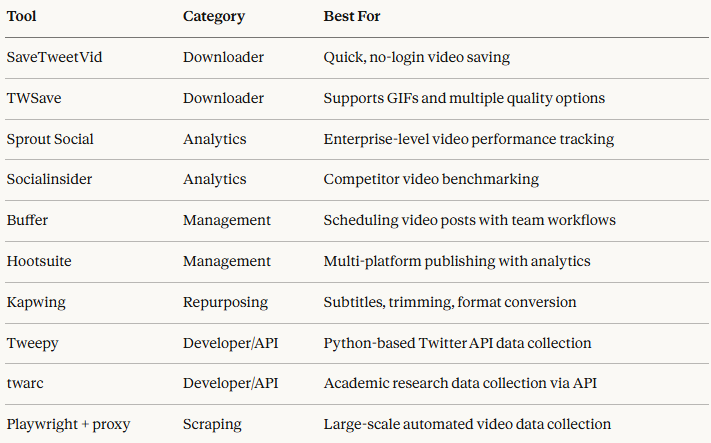
A note on tool availability: Twitter/X has significantly restricted its free API tier since 2023. Many tools that relied on free API access have either shut down or moved to paid plans. If you're building an automated workflow, budget for API costs or plan your scraping architecture accordingly.
How Developers and Marketers Use Twitter Video Tools
The use cases for Twitter video tools go well beyond simple downloading. Here's how different professional audiences actually use them:
Tracking Viral Content
Social media managers monitor trending video content in their niche to inform their own content strategy. Tools like Brandwatch and native X trending data help identify which video formats, topics, and styles are gaining traction — before the trend peaks.
Competitive Video Analysis
Marketing teams use analytics tools to benchmark their video performance against competitors: average view counts, engagement rates per follower, posting frequency, and which video types generate the most responses. This data drives decisions about content format and budget allocation.
Building Video Datasets for Research
Academics, data journalists, and ML engineers regularly need large collections of Twitter video data — tweet metadata, video URLs, timestamps, and engagement metrics — for training models, studying information spread, or analyzing platform behavior. This typically requires programmatic data collection through the API or structured scraping.
Social Media Automation
Agencies and growth teams use automation tools to manage multiple client accounts: scheduling posts, monitoring mentions, tracking keyword-related video content, and generating performance reports. Automation at this scale often runs into rate limits, which is where proxy infrastructure becomes relevant.
Repurposing High-Performing Content
Content teams extract videos from Twitter to republish across YouTube Shorts, Instagram Reels, or TikTok — adapting format and adding captions in the process. Content repurposing tools handle the format conversion; video downloader tools handle the initial extraction.
Using Twitter Video Tools with Proxies
For most casual users — someone saving a video to watch later, or a marketer checking their own post analytics — proxies aren't necessary. But once you move into automation, bulk data collection, or multi-account management, proxy infrastructure becomes a core part of the setup.
Why Twitter/X Aggressively Rate-Limits Requests
Twitter/X enforces strict rate limits at the IP level. If a single IP address makes too many API calls or page requests in a short window, it gets throttled or temporarily blocked. For a developer running a data collection pipeline, or an agency managing dozens of client accounts, hitting these limits repeatedly kills productivity and data quality.
How Proxies Solve This Problem
Proxies route your requests through a pool of different IP addresses, distributing traffic so no single IP triggers rate limits. Instead of 500 requests all coming from one IP, they appear to come from hundreds of different users across different locations.
For Twitter/X specifically, dynamic residential proxies are the preferred solution. These are IPs assigned by real ISPs to real home users — they carry legitimate attribution and don't appear on datacenter or proxy blacklists. Twitter/X is quite good at detecting and blocking datacenter IPs, so residential IPs are the practical choice for serious automation work.
Typical use cases where residential proxies pair with Twitter video tools:
- Bulk scraping: Collecting thousands of tweet video URLs, metadata, and engagement counts without hitting rate limits
- Multi-account management: Each account operates through a dedicated residential IP, preventing cross-account association
- Geo-targeted data collection: Accessing Twitter content as it appears to users in specific countries, useful for regional trend analysis
- Automated posting workflows: Running scheduled posting pipelines across multiple accounts without triggering platform-level bans
IPOasis offers a dynamic residential proxy network purpose-built for this kind of workload — with a global IP pool, city-level geo-targeting, and rotation modes you can configure per request or per session depending on whether your workflow needs fresh IPs on every call or persistent sessions for login-based tasks.
How to Choose the Right Twitter Video Tool
With so many tools in this space, the decision comes down to five questions:
1. What's your primary goal? Downloading a single video is a different problem from collecting 10,000 tweets with video content. Match the tool's scope to your actual need — don't overbuild for casual use, and don't underestimate the infrastructure required for scale.
2. Do you need API access or is scraping sufficient? The official Twitter/X API gives you structured, reliable data but costs money and has usage caps. Scraping is more flexible and cheaper, but requires more engineering effort and is more brittle when the platform changes its layout or rate-limiting behavior.
3. Is the tool actively maintained? The Twitter/X tool ecosystem has been volatile since 2023. Many browser extensions and web scrapers broke when X changed its frontend. Before committing to a tool, check when it was last updated and whether its GitHub issues or support channels show recent activity.
4. What's your compliance requirement? If you're a researcher or enterprise user, you may need to stay within X's official terms of service. Academic users should look at the Academic Research access tier. Commercial users collecting competitive data should consult legal counsel before building large-scale scraping infrastructure.
5. Do you need proxy support? If you're running anything at volume — more than a few hundred requests per day — factor proxy costs and integration into your tool selection from the start, rather than adding it as an afterthought when you start hitting blocks.
Limitations and Best Practices
Know the Platform's Rules
Twitter/X's terms of service prohibit scraping in ways that "interfere with, disrupt, or negatively affect" the platform. For most research and analytics use cases, this is a gray area — but building tools specifically designed to circumvent rate limits at massive scale carries legal and account risk. Use rate limiting in your own code, not just proxies.
Don't Rely on a Single Tool
The Twitter/X ecosystem shifts fast. Free tools get deprecated, APIs change pricing, and X regularly updates its frontend in ways that break scrapers. Build workflows that can swap out individual components without full reconstruction.
Store What You Collect
If you're collecting Twitter video data for research or analysis, store raw results locally as soon as you collect them. Platform content can be deleted, accounts can go private, and historical data through the API gets progressively harder to access over time.
Respect Individual Privacy
Just because content is publicly posted doesn't mean bulk collection and republication is ethical in all contexts. Be especially careful with video content involving private individuals, and follow data minimization principles — collect what you need, not everything you can.
Test Your Setup Before Scaling
Before running a large collection job, test your proxy rotation, request pacing, and data storage pipeline on a small sample. Debugging a broken scraper after it's collected 50,000 records is significantly more painful than catching issues at 100.
Frequently Asked Questions
Can you download videos from Twitter?
Yes. Twitter/X doesn't offer a native download button, but third-party web tools like SaveTweetVid and TWSave allow you to paste a tweet URL and download the video in MP4 format. Browser extensions can also add a download button directly to your feed. For programmatic downloading at scale, Python scripts using the yt-dlp library are a common developer approach.
What tools help analyze Twitter video performance?
For individual creators and small teams, Twitter/X's native analytics (available under the Analytics tab) shows views, engagements, and impressions per video. For deeper analysis or competitor benchmarking, paid tools like Sprout Social, Socialinsider, and Brandwatch provide video-level metrics, trend tracking, and cross-platform comparison.
Are Twitter video downloaders legal?
Downloading publicly posted videos for personal, offline use is generally tolerated, but republishing downloaded content without the creator's permission violates copyright law in most jurisdictions. Using automated tools to bulk-download content at scale may also conflict with Twitter/X's terms of service. When in doubt, get the creator's permission before reusing their content.
How do developers collect Twitter video data at scale?
Developers typically use one of three approaches: the official Twitter/X API (paid, structured, rate-limited), yt-dlp for individual video downloads, or custom scrapers built with Playwright or Selenium. For large-scale collection without hitting IP-based rate limits, scraping pipelines are typically paired with a rotating residential proxy pool to distribute requests across many IPs.
Do I need proxies for large-scale Twitter data collection?
Yes, for most serious automation or data collection workflows. Twitter/X enforces rate limits at the IP level, meaning a single IP address making hundreds of requests will quickly get throttled. Rotating residential proxies distribute requests across many IP addresses, preventing any single one from triggering blocks. Dynamic residential proxies — IPs sourced from real ISPs — are the most effective option because they're significantly harder for platforms to detect and block compared to datacenter alternatives.
Conclusion
The landscape of Twitter video tools is broader than most people realize. At one end, there are simple web-based downloaders for grabbing a single clip. At the other, there are complete data engineering pipelines that collect, process, and analyze thousands of Twitter videos at scale — with proxy infrastructure, API wrappers, and storage systems all working together.
The right approach depends entirely on what you're trying to accomplish:
- Casual users need nothing more than a reliable downloader like SaveTweetVid
- Social media managers should invest in an analytics platform like Sprout Social or Socialinsider
- Developers and researchers need to plan their API vs. scraping architecture carefully, and build proxy support in from the start
- Agencies managing multiple accounts need residential proxies and session management built into their automation stack
Whatever your use case, build your workflow around tools that are actively maintained, understand the platform's limitations before you hit them, and match your infrastructure to your actual volume requirements. Starting small and scaling deliberately will save you significant debugging time compared to building everything at once.