Unseen Proxies: What the Request Hides
Unseen proxies means the target site sees the proxy exit IP, not the IP at your office. That is the whole mechanism: the gateway opens the connection from a different address. A residential exit does this for a price-check or account job.
What unseen proxies means
Unseen proxies is a label, not a protocol and not a vendor. It means the site you call logs the proxy address, not the address of the machine that started the request. Nothing in the HTTP spec is named unseen.
The path is short. Your client sends the request to the gateway. The gateway opens a new connection to the target. The target's log line is the exit IP. Your office IP is not on that connection.
People also call this an anonymous proxy. That name points at the same hop: the site does not receive the client address. It is not a second product, and it is not a setting you turn on after the gateway is already in place.
The request path is the part you can set up. Client to gateway, gateway to target, target logs the exit IP. That is the setup the rest of this page walks through.
What does the target site still see?
After the hop, the address in the target's log is the exit IP. That is what high anonymity means for a scrape or a price check. It is not an extra switch on top of the proxy.
A transparent proxy is the other case. It forwards the client address to the target, so the site still sees the office IP. A residential gateway does not work that way. You do not enable a second anonymity layer after the request already leaves from the exit.
Elite proxy is another label for the same hop. It means the target does not receive the client address. It does not mean the exit has no network number. Treat elite, anonymous, and unseen as one description, then pick the exit from the job, not from the adjective.
Which exit should a job use?
The exit type follows the job. The word unseen does not pick it for you. Hiding the office IP is already done once the gateway is in the path. What changes is which network the new IP belongs to.
Send the job through a residential exit when the work is a batch of public pages. IPOasis rotating residential starts at $0.78/GB, and unused traffic does not expire. Keep that exit for the whole job, then open another for the next batch.
A price check is the common case. Check competitor prices without showing your office IP by letting the gateway place the request. The store logs the exit, not the address of the desk where the script runs.
An account job is the other case. Use one dedicated IP and stay on it. Do not call that a sticky session. Sticky, on IPOasis rotating residential, is the same exit for one job, up to 120 minutes. A dedicated IP is a different product.
How do you check the exit before a job?
A check is one request that prints the exit IP before you send the batch. Run it first. A failed batch is a bad time to learn which address the site saw.
- Request an IP-echo URL through the exit and save the address it prints.
- Look up that address's ASN. It has to differ from the office network, or you have not changed networks.
- Request one target URL through the same exit. A 200 and page text means you can add the next URL. A 403 whose body says the ASN is banned means you change networks. Another IP in the same host is the same ban. That failure is not a missing anonymity switch.
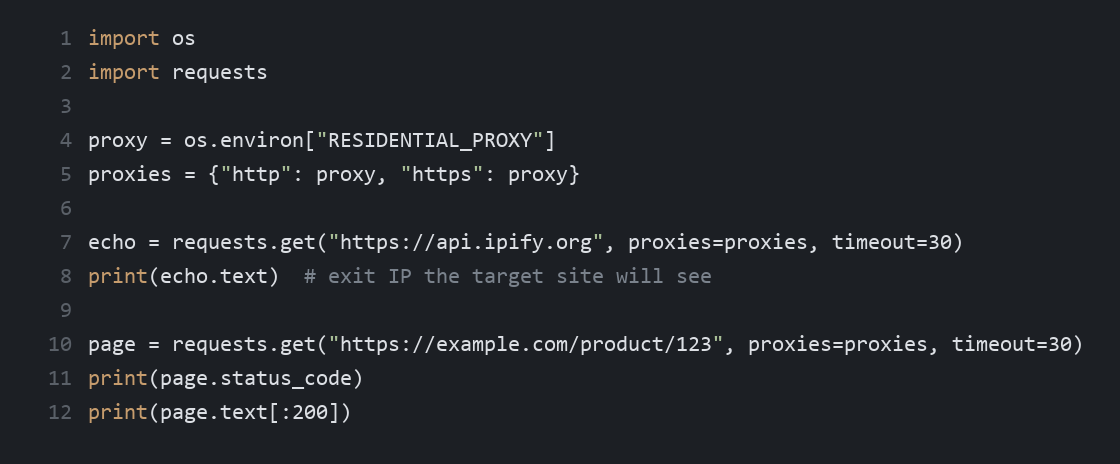
The first print is the address the target will store. The second print is the status of one real URL. If those two calls used different exits, the check does not describe the job.
Save both lines next to the job name. The next failure is only useful if you can see whether the exit IP changed. A new IP in the same hosting network will fail the same way. A new IP from a consumer ISP is a real network change. That is the comparison the two lines are for.
How do you run the next batch?
A batch starts after the echo IP and the office IP differ. Use that exit for the next URLs in the same job. Parse the page you get back, then open a new exit for the following job.
If the body names an ASN ban, look up the exit ASN and send the echo through a residential exit before you add URLs. A second address in the same hosting network is the same network. A consumer ISP address is the change the ban is checking for.
Send the job through a residential exit and keep it for that batch. Then repeat the echo. The two printed lines, exit IP and status, are the record you compare on the next run.
FAQ
What are unseen proxies?
Unseen proxies are exits that place the request so the target site logs the proxy IP instead of your office IP. The word is a description of that hop. It is not a protocol name and not a plan name on a pricing page.
Are unseen proxies the same as anonymous proxies?
Yes, for this job. An anonymous proxy is the technical name for a hop that does not pass the client address to the target. Unseen is the looser label for the same hop. You do not configure both. Elite proxy is a third name for that hop, not a higher plan you add later.
If the site still blocks me, did the proxy fail to hide my IP?
No. A block after the hop means the site refused the exit IP or the network that exit belongs to. Your office IP was already off the connection. Read the body. An ASN ban needs a different network, not another anonymity setting on the same exit.
Should a scraper use a residential exit for this?
Yes, when the job is a batch of public pages and the site bans hosting networks. A residential exit is an address from a consumer ISP, so the log line is not your office and not a cloud host. Keep one exit for one job. IPOasis rotating residential starts at $0.78/GB, and unused traffic does not expire.
How do you confirm the office IP is off the request?
Request an IP-echo URL through the exit and read the printed address. That address is the one the target will log. If it differs from the office IP, the hop is in place. Save it next to the status of the first target URL, and use the same exit for the rest of that job.
Conclusion
Unseen proxies only means the target site does not see your office IP. The exit still has a network number, and that number can be banned. Use a residential exit for a scrape, and one dedicated IP for an account.