How to set up IPOasis proxies in Afina Browser for safe multi-accounting
An antidetect browser with a clean proxy gives each account a separate IP, fingerprint, cookies and cache for lower linking signals. Teams use this setup to manage profiles, test geos or separate scraping sessions. The weak points are simple: IP changes, WebRTC leaks and settings contradicting proxy location.
A proxy changes the visible network address. It does not split cookies, cache or device parameters by itself. That is why a separate browser profile matters. Afina can assign a proxy, fingerprint and storage to each profile, while its leak checks help show how antidetect browsers are tested for WebRTC and UDP leaks. That setup reduces account linking signals, but it does not cancel platform rules or account history.
Why does multi-accounting need a clean proxy and an antidetect browser?
Multi-accounting needs both layers because platforms compare network signals, browser signals and saved session state. IP, ASN, DNS and WebRTC show where traffic appears to come from. Fingerprint data shows the device. Cookies, cache, localStorage and IndexedDB show whether the profile has previous history.
A clean proxy will not protect ten profiles that share the same browser fingerprint. Separate fingerprints will not help much if all profiles use one unstable IP. In Afina, fingerprint settings include the operating system, GPU, Canvas, WebGL, Audio, ClientRects and screen size. The practical goal is not random noise everywhere. The goal is a believable profile that matches the proxy context. For the rendering layer, this guide explains how Canvas and WebGL fingerprinting works.
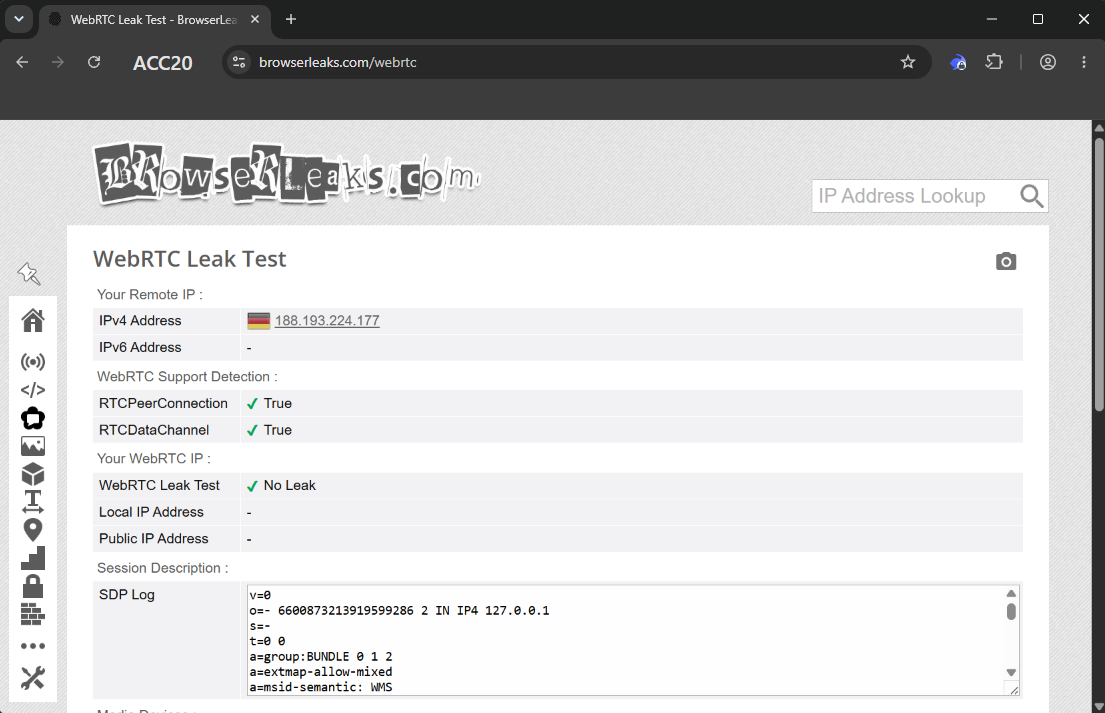
WebRTC and UDP deserve a separate check. HTTP and HTTPS proxies usually carry normal TCP traffic. WebRTC, QUIC, HTTP/3 and WebTransport may use UDP, so a profile can pass a basic IP checker and still leak through another route. Afina supports HTTP, HTTPS and SOCKS5. When the selected SOCKS5 proxy really supports UDP, Afina can route modern UDP traffic through it. If UDP is unavailable, the browser may fall back to TCP behavior.
Session stability matters too. A static address or sticky session keeps one IP during the work cycle. Rotation on every request can help independent scraping, but it is a poor fit for active logins with cookies. Afina can block launch when the proxy country changes. A separate kill switch for every IP change is not confirmed as released, so do not build around that assumption.
How do you add and check an IPOasis proxy in Afina step by step?
Start from the IPOasis dashboard and copy the connection details for the exact proxy product. Pick the type, country and session mode before opening the browser profile.
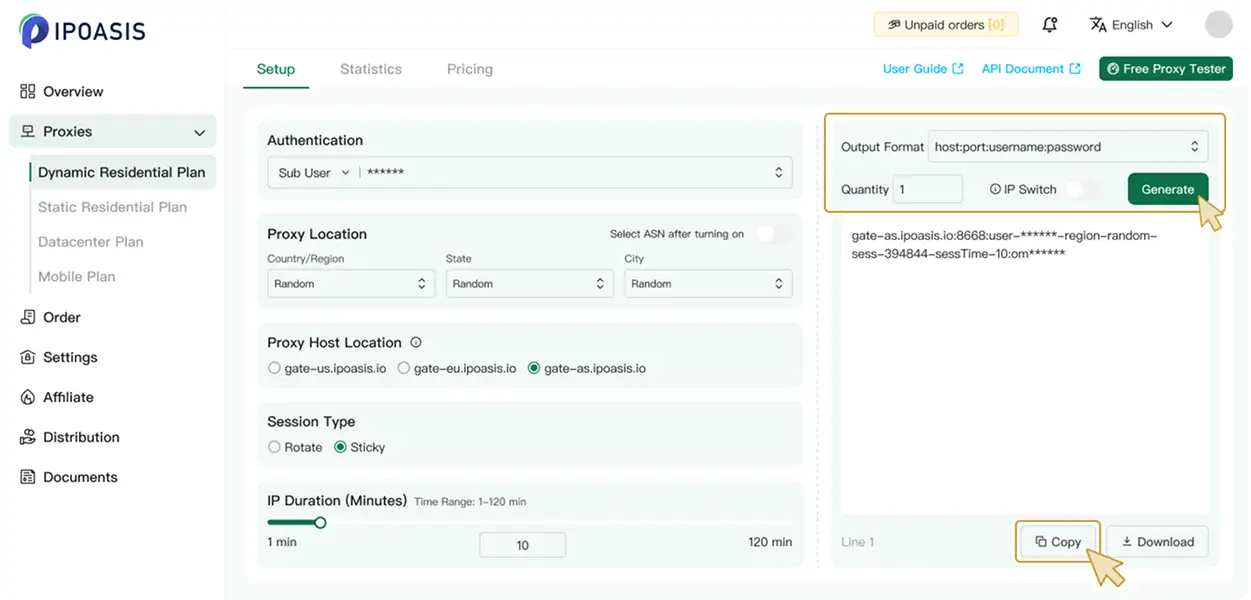
Use SOCKS5 for WebRTC, QUIC and HTTP/3 only when UDP support is confirmed. A proxy can support SOCKS5 for normal browsing and still fail a UDP route check.
Copy the host, port, protocol and authorization data. Create a profile in Afina or open an existing one for editing. Go to proxy settings and enter the copied parameters.
After entering the data, run the check. Compare the outgoing IP, country and UDP mark. An unchecked proxy is better left unsaved.
Use SOCKS5 for WebRTC, QUIC and HTTP/3 only when UDP support is confirmed. A proxy can support SOCKS5 for normal browsing and still fail a UDP route check.
Copy the host, port, protocol and authorization data. Create a profile in Afina or open an existing one for editing. Go to proxy settings and enter the copied parameters.
After entering the data, run the check. Compare the outgoing IP, country and UDP mark. An unchecked proxy is better left unsaved.
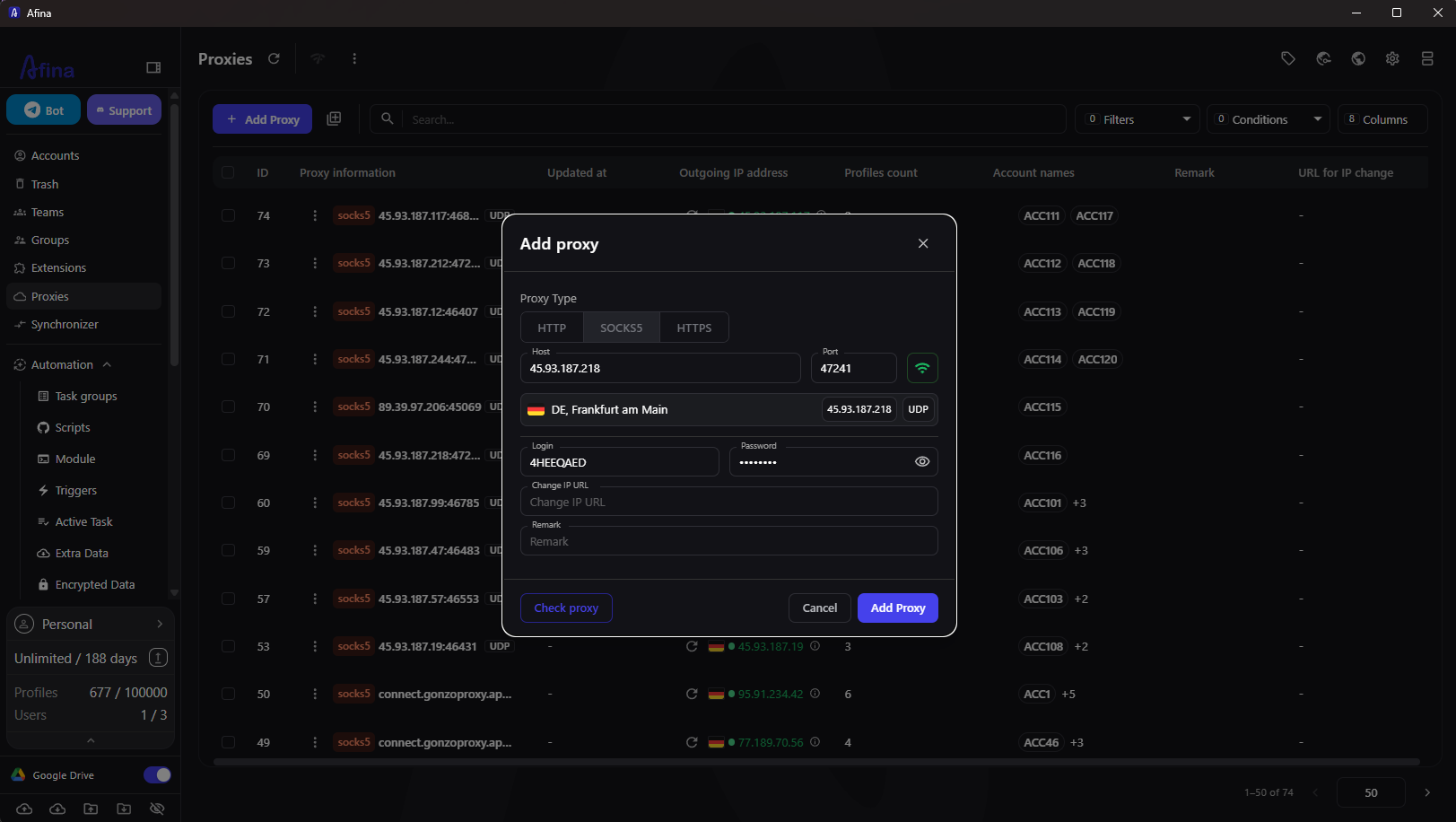
Set the language and time zone by IP, then check DNS and WebRTC. Save the profile or switch to bulk adding for a large pool.
The check result is visible in the proxy table. Look first at the outgoing address and country. The UDP mark matters for WebRTC or QUIC scenarios.
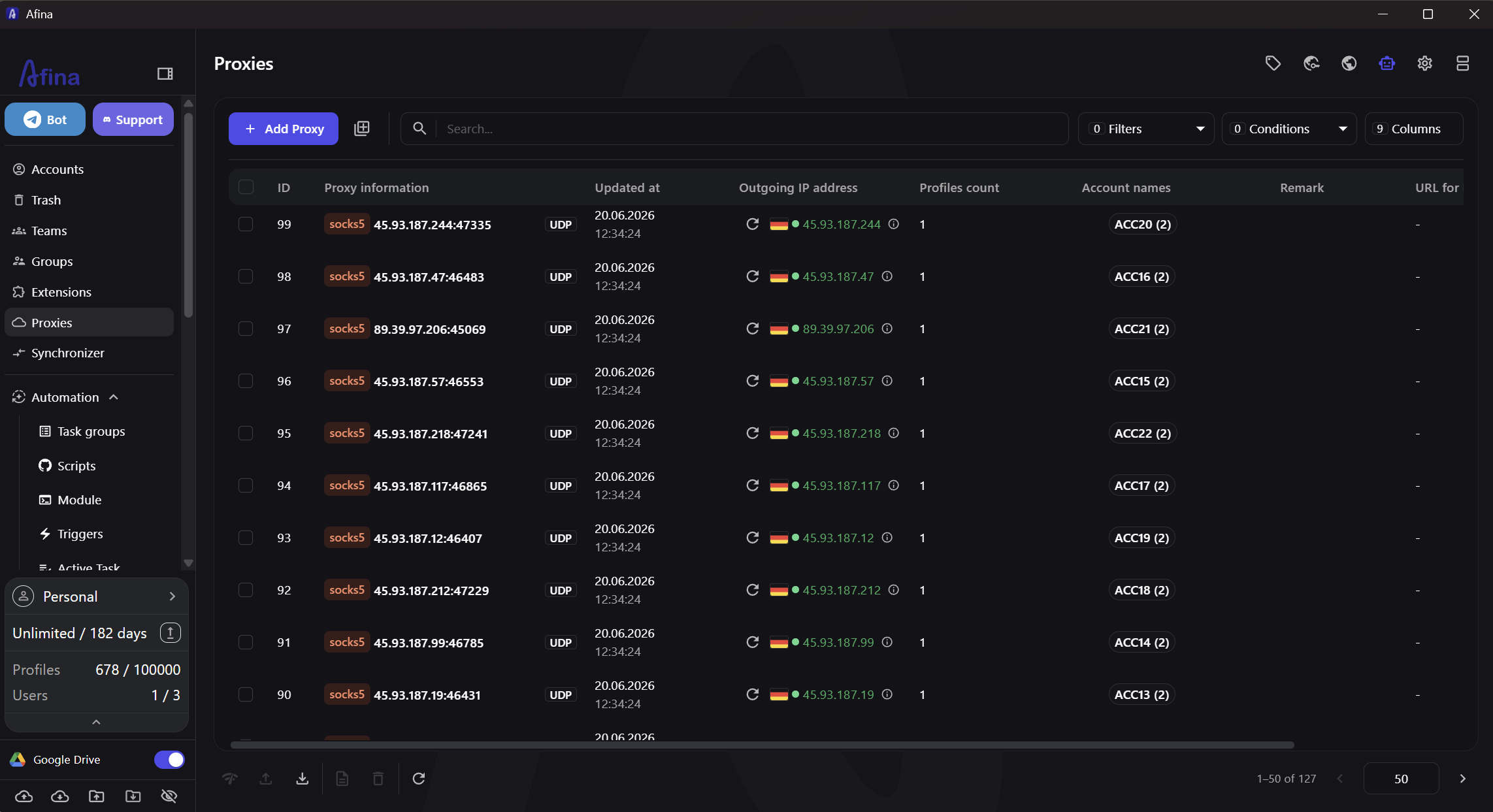
The outgoing IP should match the address issued by IPOasis. Then launch the profile and compare Remote IP with WebRTC Public IP. If the test shows the real address, check UDP and the network route. Also temporarily disable VPN extensions: they often intercept connections on top of profile settings.
Large proxy pools are easy to break with manual input. In the bulk import window, each record goes on a separate line, and parsed fields appear before saving.
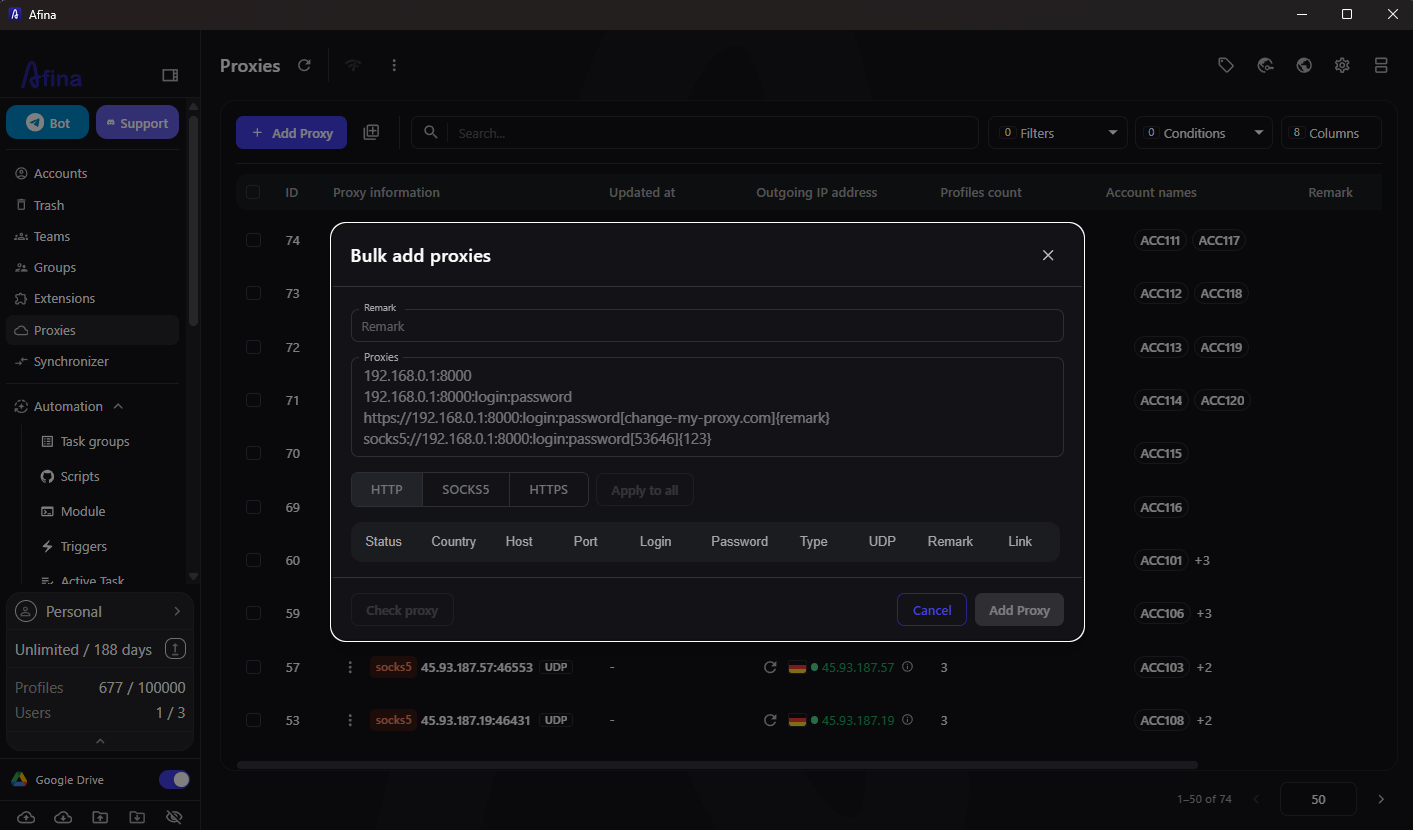
For SOCKS5, specify the type or prefix clearly. Without it, Afina may recognize the record as HTTP. Check the whole list before a bulk launch, because one inactive node can stop a group of tasks at the worst moment.
Which IPOasis proxy type fits which task?
Choose the proxy type by session behavior. Logins usually need a stable address. Independent scraping can benefit from rotation. Multi-geo work needs separate pools, languages, time zones and DNS expectations.
IPOasis offers dynamic residential, static residential, mobile and datacenter proxies. Still, check protocol, authorization and rotation mode inside the IPOasis dashboard for the selected product.
The common mistake is placing a rotating proxy into a long authorized session. The IP changes, but cookies stay. For separate scraping URLs, rotation can be reasonable. A residential or mobile ASN will not fix a conflict between network location and browser fingerprint.
What should you check before launching accounts?
Do not trust one green indicator. Compare the Afina proxy result with IPOasis data, then test the route inside the browser. IP, country, language, time zone, DNS and WebRTC should match.
Use this checklist before moving real accounts into work:
- check the outgoing IP, country and ASN
- compare Remote IP with WebRTC Public IP
- match language and time zone to the selected proxy country
- test DNS and QUIC or HTTP/3 when these protocols are part of the task
- review checking proxy reputation before launch
- avoid changing the address inside an active sticky session
A careful profile does not remove platform limits, account history or manual review. It only reduces technical signals that can connect unrelated accounts. This material is provided for informational and educational purposes, and each user is responsible for following platform rules and applicable laws.
New users get the Base plan free for 4 days. Promo code SALE20 gives 20% off the first payment.
FAQ
Can HTTP be used instead of SOCKS5 in an antidetect browser?
Yes, HTTP is suitable for ordinary TCP browsing. WebRTC, QUIC and HTTP/3 need SOCKS5 with real UDP support, or those protocols should be disabled or avoided.
Why does the proxy work while WebRTC shows the real IP?
WebRTC can send STUN requests through UDP outside a TCP proxy route. Check UDP support, the selected proxy protocol and any VPN or network extension inside the profile.
Does every browser profile need a separate proxy?
Long-lived accounts usually work better with one stable proxy per profile. The exact ratio depends on the platform rules, account age and task pattern.
What is the difference between a static residential proxy and a rotating proxy?
A static residential proxy keeps one address, while a rotating proxy changes addresses between requests or sessions. Static fits logins better; rotation fits independent requests better.
How do you check a proxy IP in an antidetect browser?
Run the browser proxy check, then compare the outgoing IP with Remote IP and WebRTC Public IP. Also verify country, DNS, language and time zone.
Can a residential proxy remove the risk of an account ban?
No, a residential proxy cannot remove account ban risk. The result depends on IP reputation, fingerprint consistency, account history and the rules of the target platform.