What Is Leaf Browser? Why It Still Needs a Residential Proxy

Leaf Browser isolates browser fingerprints. It does not isolate IP addresses. That's half of the "will I get linked and banned" problem solved. If every profile still exits through the same network connection, a platform can tie them back together no matter how convincing the fingerprint looks.
This guide explains what Leaf Browser actually protects, what it leaves exposed, and how pairing it with a residential proxy closes the gap.
What Is Leaf Browser?
Leaf Browser runs many separate, isolated profiles on one machine, each with its own cookies, local storage, and its own synthetic fingerprint: user agent, canvas and WebGL output, installed fonts, screen size, timezone, and the other values a site reads to identify a device. Two profiles opened side by side on the same computer should look, from the website's side, like two unrelated visitors rather than the same operator switching tabs. Cookies, cache, and local storage never cross between profiles either, so there's no session data left behind to connect them.
It sits in the same category as other anti-detect browsers on the market (AdsPower, GoLogin, Dolphin Anty, Multilogin, and similar tools), and functionally they all solve the same underlying problem: keep account A's browser session from looking anything like account B's, even though both live on the same physical machine.
Why People Use Leaf Browser
Almost nobody searches for an anti-detect browser out of curiosity. It shows up on people's radar because they already hit a wall managing more than one account on the same platform, usually after a ban or a suspicious-activity warning. The recurring cases:
In every one of these, the underlying fear is the same: the platform notices that "different" accounts are actually operated by the same person or team, and shuts them all down together instead of just one.
What Leaf Browser Protects
Leaf Browser's job is the fingerprint layer, and it does that job well:
- Canvas and WebGL masking. Prevents the hardware-level rendering signature, generated when your browser draws a hidden test image, from being identical across profiles.
- Font, screen, and hardware value spoofing. Stops two profiles from reporting the exact same device configuration down to the installed font list and screen resolution.
- Cookie and storage isolation. Keeps session data, local storage, and cache fully separated between profiles, so no leftover data links one account to another.
If fingerprinting were the only signal platforms checked, this would be the whole story, and pairing anything else with Leaf Browser would be unnecessary. It isn't the whole story.
What Leaf Browser Doesn't Protect
Leaf Browser has no control over the network your traffic actually travels through. Every profile, unless you configure something separately, exits to the internet through the same IP address, usually your home or office connection.
That means ten "unrelated" browser profiles can still leave one identical fingerprint behind at the network level: the same IP, hitting the same platform, over and over, all day. Anti-fraud systems are built specifically to catch this exact pattern, correlating accounts by shared IP regardless of how different their browser fingerprints look. A perfectly spoofed fingerprint does nothing to hide it, because the platform was never looking at the fingerprint for that particular signal.
Why IP Reputation Still Matters
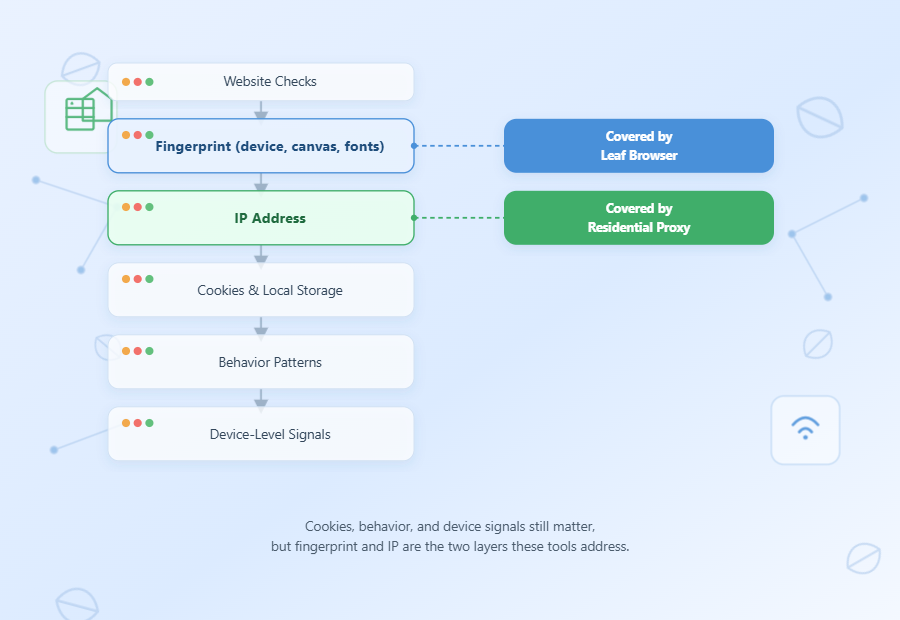
Platforms don't rely on any single signal to link accounts. They evaluate several layers together, and the exact weighting varies by platform, but the recurring signals are:
- Fingerprint (device, canvas, fonts)
- IP address
- Cookies and local storage
- Behavior patterns
- Device-level signals
IP address is one of the strongest of these, precisely because it's much harder to fake convincingly than a browser value.
An anti-detect browser like Leaf Browser only covers the fingerprint layer in that chain. That split matters most in multi-account social workflows, where one reused fingerprint links every profile. A residential proxy is what covers the IP layer. Neither one substitutes for the other. They protect different, independent signals, and a platform only needs one of them to line up across "different" accounts to draw the connection between them.
In practice, most platform anti-fraud systems run this correlation automatically and quietly, without ever showing the operator a warning first. They log the IP behind every login and action, then periodically cross-reference which accounts share a network origin, how often, and at what volume. A dozen accounts logging in from one home IP within the same hour reads very differently to that system than a dozen accounts logging in from a dozen unrelated residential addresses spread across the same region, even if every one of those accounts has a flawless, fully spoofed fingerprint. The fingerprint check and the IP check run independently, and failing either one is often enough to trigger a review.
Residential Proxy + Leaf Browser
The fix is straightforward in concept: give each Leaf Browser profile its own IP address, so the network layer is as isolated as the fingerprint layer already is.
- One IP per profile. Instead of every profile sharing your real connection, each one routes through a distinct residential IP, so no two "accounts" share a network fingerprint either.
- Sticky vs. rotating sessions. Long-lived accounts, like a seller account or a social profile, generally want a sticky IP that holds steady for hours or days, so the account doesn't look like it's teleporting between cities every few minutes. Scraping or short-lived tasks are usually better served by rotating IPs that change frequently instead.
- Matching geo. The IP's location should stay consistent with the account's stated region. A mismatch between IP geolocation and account history is its own red flag, entirely independent of anything the fingerprint reports.
Any residential proxy provider can close this specific gap, as long as it offers real ISP-issued IPs with both sticky and rotating session options and enough regional coverage to match wherever your accounts are supposed to be based. If you're looking for one to test this setup with, IPOasis Dynamic Residential proxies cover 80M+ residential IPs across 195 regions with both session types, connect using whichever output format your setup expects, and offer a 2GB trial for $1.99 to try the pairing before committing further.
Leaf Browser Alone vs. Leaf Browser Paired with a Proxy
Putting the three common setups side by side makes the gap easier to see:
None of these categories are absolute guarantees; no combination of tools eliminates detection risk entirely, and a poorly configured proxy or an inconsistent fingerprint can still slip through the cracks in any of the three setups. But separating both the fingerprint and the IP consistently removes the two signals that platforms rely on most, which is the difference between an occasional flag and a systematic one.
Quick Setup
Pairing the two tools takes only a few steps once the proxy side is ready:
- Step One: Create a residential proxy plan and generate a list of IPs, using sticky sessions if the accounts involved are long-term.
- Step Two: Open Leaf Browser, create a new profile, and assign one proxy IP to that profile under its connection settings.
- Step Three: Repeat per profile, matching each proxy's geolocation to the account it's tied to before the first login.
After the proxy is on, run the same profile through a browser fingerprint check so you are not trusting Leaf’s panel alone.
The most common mistake at this stage isn't the proxy setup itself, it's skipping the geo-matching step. An account with a US-based history that suddenly logs in through a residential IP from a different country looks exactly like a hijacked account to most platforms, which can trigger the same review process a shared IP would. Keeping each profile's proxy region aligned with that account's actual history avoids creating a new red flag while fixing the old one.
FAQ
1. Does Leaf Browser include a built-in proxy?
No. Leaf Browser is a fingerprint and profile isolation tool, not a proxy provider. A common misconception among people new to anti-detect browsers is treating "anti-detect browser" and "residential proxy" as the same category of product; they aren't, and Leaf Browser doesn't route your traffic through a different IP on its own. You need to supply and assign a proxy separately for each profile.
2. Can Leaf Browser replace a residential proxy?
No. Leaf Browser handles browser fingerprint isolation; a residential proxy handles IP isolation. They protect two separate signals, and platforms check both, so dropping either one leaves a visible gap.
3. Can I use one proxy for multiple Leaf Browser profiles?
Technically yes, but it defeats the purpose. If several "different" accounts share one IP, that shared IP becomes the exact thing that links them together. Each profile that needs to look independent should get its own IP rather than sharing a pool with the others.
4. Can websites still detect Leaf Browser even with a proxy?
It's possible if either side is poorly configured: a masked fingerprint that looks artificial, or an IP whose geolocation contradicts the browser's timezone, can still raise flags on its own. A consistent fingerprint plus a matching, clean IP is what makes the combination actually work as intended.
5. Residential vs. datacenter proxy: which pairs better with Leaf Browser?
Residential. Datacenter IPs are issued in known server ranges that many platforms already flag on sight, which undercuts the isolation Leaf Browser is trying to create in the first place. Residential IPs come from real ISPs, so they don't carry that same baseline suspicion before a single request is even made.
6. Do free proxies work with Leaf Browser?
They can technically connect, but free and shared proxy lists are typically reused by large numbers of people at once, which makes the IP itself already flagged or rate-limited before you even start. For anything beyond casual testing, a dedicated residential proxy plan is the far more reliable option.
Bottom Line
Modern platforms don't rely on a single signal. Browser fingerprints, IP addresses, cookies, device characteristics, and behavioral patterns all feed into their risk models together. Anti-detect browsers and residential proxies aren't competing solutions; they're complementary tools built to solve different parts of the same problem.
Fingerprint tells websites who you appear to be. Your IP tells them where you appear to come from. Platforms evaluate both. The pattern isn't unique to Leaf Browser either: any anti-detect browser, whether that's Leaf, AdsPower, GoLogin, Dolphin Anty, or something else entirely, runs into the same ceiling once the accounts involved start sharing a network connection. The tool changes; the missing layer doesn't.
If you're already running an anti-detect browser and only handling the fingerprint side of that equation, the IP is very likely the half that's still exposed, and a residential proxy is what closes it.