Why Does Foxy Proxy Make My Browser Not Secure?
Seeing a warning like “Your connection is not secure” after turning on FoxyProxy can be scary. Many users immediately ask, “Why does Foxy Proxy make my browser not secure?” The good news is this: FoxyProxy itself is not unsafe. In most cases, the warning comes from how the proxy is set up—or from the quality of the proxy you are using.
I’ve used FoxyProxy for years with different proxy providers, including free and paid ones. I’ve seen these warnings many times, and I’ve also learned how easy they are to fix once you understand what’s really happening. This guide explains why the warning appears, how to fix it in minutes, and how to use FoxyProxy safely with a trusted proxy like a dynamic residential proxy. No technical background is needed.
Why Does Foxy Proxy Trigger “Not Secure” Browser Warnings?
1. Untrusted SSL Certificates
When you visit an HTTPS website, your browser checks a digital “ID card” called an SSL certificate. This certificate proves the site is safe. When FoxyProxy sends your traffic through a proxy server, that proxy also needs a trusted certificate to handle encrypted connections.
If the proxy’s SSL certificate is missing or not trusted by your browser, the browser thinks something is wrong. That’s when you see warnings like “Not secure” or “Untrusted certificate.” This is not FoxyProxy doing anything dangerous. It’s simply a missing setup step that many users don’t know about.
2. Low-Quality or Free Proxies
Another common reason is the proxy itself. Free or very cheap proxies often use shared IPs, expired certificates, or weak encryption. Some are already flagged for suspicious activity. When you connect through these proxies using FoxyProxy, your browser detects risk and shows a warning.
In simple terms, FoxyProxy is just the tool. The security risk usually comes from the proxy you connect to, not from FoxyProxy.
3. Simple Steps to Fix FoxyProxy Browser Security Warnings
Step 1: Add the Proxy’s SSL Certificate to Your Browser
This is the most important fix. Once done, warnings usually disappear.
- Open FoxyProxy and go to Options.
- Find your proxy’s SSL certificate. If you don’t see one, ask your proxy provider.
- In your browser, go to Settings → Privacy & Security → Manage Certificates.
- Import the certificate and select “Trust this certificate for website identification.”
If you use IPOASIS, this step is easy. IPOASIS provides a pre-generated SSL certificate in the dashboard, so you don’t need to create or guess anything.
Step 2: Stop Using Free or Shared Proxies
Free proxies are tempting, but they are the main reason users see security warnings. Many of them log your data, inject ads, or use outdated certificates. Browsers do not trust them.
A dynamic residential proxy for FoxyProxy works much better. These proxies use real household IPs and encrypted connections. Browsers see them as normal users, not risky traffic. When I switched from a free proxy to a dynamic residential proxy, the warnings stopped almost immediately.
Step 3: Check FoxyProxy’s WebRTC Settings
WebRTC is a browser feature that can leak your real IP address, even when a proxy is active. This can confuse websites and trigger warnings.
- Open FoxyProxy Options.
- Enable Block WebRTC.
- Restart your browser.
This simple change helps prevent IP leaks and makes your proxy setup more stable and secure.
Proxy Type vs. FoxyProxy Security
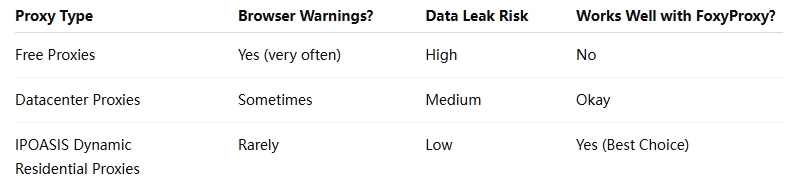
From personal experience, browsers trust residential IPs more. When I moved to a dynamic residential proxy, my FoxyProxy setup became smoother and warning-free.
Real User Scenario: A Simple Switch That Solved Everything
Maria runs a small online business. She used FoxyProxy with a free proxy to browse safely, but Chrome kept showing “Your connection is not secure.” She worried about passwords and customer data.
After switching to IPOASIS dynamic residential proxies, she did three things:
- Imported the SSL certificate from the IPOASIS dashboard.
- Turned on WebRTC blocking in FoxyProxy.
- Stopped using free proxies.
The warnings disappeared the same day. Her pages loaded faster, and she felt confident using FoxyProxy again.
FoxyProxy Security FAQs
Is FoxyProxy itself an unsafe tool?
No. FoxyProxy is open-source and has been trusted since 2006. It does not spy on you or steal data. The warning comes from the proxy you use with it, not FoxyProxy itself. Think of it like a car: the car is safe, but bad fuel causes problems.
Why do I still see warnings after adding the SSL certificate?
This usually happens if the certificate is expired or added to the wrong browser. For example, you may add it to Chrome but use FoxyProxy in Firefox. Make sure the certificate is valid and added to every browser you use. Providers like IPOASIS renew certificates automatically, which avoids this issue.
Can I use FoxyProxy with a VPN to fix security issues?
In most cases, no. A VPN plus FoxyProxy can conflict and slow your connection. A secure proxy with encryption is enough. Using both tools together may actually cause more warnings, not fewer.
Will FoxyProxy log my browsing data?
FoxyProxy does not log your data by default. However, the proxy provider might. Free proxies often log and sell browsing data. An IPOASIS no-log proxy avoids this risk and keeps your activity private.
1-Minute FoxyProxy Security Check
- Open FoxyProxy and confirm the correct proxy is active.
- Visit whatismyipaddress.com.
- Check if the IP and location match your proxy.
If you see a warning on this page, your SSL certificate is missing or untrusted. Importing a proper certificate usually fixes it right away.
Final Thoughts
So, why does Foxy Proxy make my browser not secure? In most cases, it doesn’t. The warning usually comes from missing SSL certificates or unsafe proxies. With a few simple steps and a trusted proxy setup, FoxyProxy can be safe and reliable.
If you want fewer warnings and better peace of mind, use FoxyProxy with a dynamic residential proxy that offers encryption, trusted certificates, and a no-log policy. That’s what finally made my setup stable—and stress-free.