Backconnect Rotating Proxy: How It Works for Web Scraping and Automation
If you've ever tried to scrape data at scale, run automation tools, or verify ads across different regions, you've probably hit a wall — your IP gets blocked, flagged, or rate-limited. That's exactly the problem a backconnect rotating proxy is built to solve. In this guide, you'll learn what it is, how it works under the hood, and how to pick the right one for your needs — even if you're completely new to proxies.
What Is a Backconnect Rotating Proxy?
A backconnect rotating proxy is a type of proxy server that automatically assigns you a new IP address from a large pool every time you make a request — or at set intervals. The term "backconnect" refers to the architecture: instead of connecting you directly to a single proxy IP, a backconnect server sits in the middle and routes your traffic through a constantly rotating pool of exit nodes.
Think of it like this: instead of sending letters from one return address, you're sending them from thousands of different addresses every time. Websites see a different IP on every request, making it nearly impossible to detect or block your activity.
Key characteristics:
- Single gateway entry point — you connect to one endpoint, the system handles the rest
- Automatic IP rotation — no manual switching required
- Large IP pool — typically thousands to millions of residential IPs
- Session control — you can choose sticky sessions (keep the same IP for a period) or rotating sessions (new IP per request)
How Backconnect Proxies Work
Here's a straightforward breakdown of what happens when you send a request through a backconnect rotating proxy:
- You send a request to the backconnect gateway (a single IP and port assigned by your provider).
- The gateway receives your request and selects an available IP from its residential proxy pool.
- Your request is forwarded through that residential IP to the target website.
- The website responds to the residential IP, which passes the data back to you through the gateway.
- On the next request, the gateway may select a completely different IP from the pool — or keep the same one if you've configured sticky sessions.
This entire process happens in milliseconds. The target website never sees your real IP address — it only sees the residential exit node, which looks like a completely normal home user browsing the web.
What Makes It Different from a Regular Proxy?
With a standard proxy, you're assigned a fixed IP. If that IP gets blocked, your entire workflow stops. A backconnect proxy eliminates this single point of failure by distributing your traffic across thousands of IPs simultaneously. Even if one IP gets flagged, the system automatically routes your next request through a clean one.
Backconnect Proxy vs Rotating Proxy vs Static Proxy
These terms get thrown around interchangeably, but they're not identical. Here's a clear comparison:
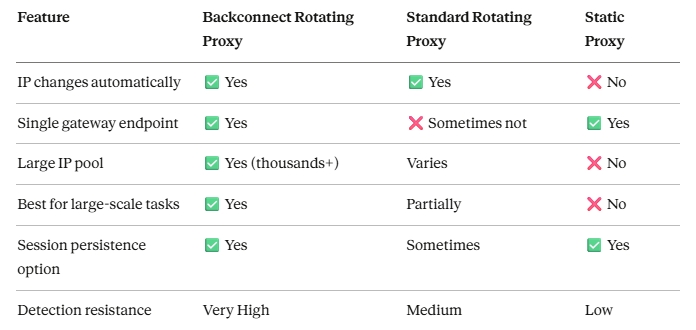
The bottom line: "Backconnect" describes the architecture (one gateway → many exit IPs). "Rotating" describes the behavior (IPs change automatically). A backconnect proxy is almost always rotating, but not all rotating proxies use a backconnect architecture.
Common Use Cases for Backconnect Rotating Proxies
Web Scraping at Scale
This is the most popular use case. When you scrape thousands of pages from a target site, your IP will eventually get blocked. A backconnect rotating proxy distributes requests across many IPs, making your scraper look like thousands of different users instead of one aggressive bot. This is essential for e-commerce price monitoring, SEO data collection, and lead generation.
Ad Verification
Marketers and ad fraud teams use backconnect proxies to verify how ads appear in different locations, on different devices, and for different audience segments — without triggering detection filters that would show them sanitized results.
Sneaker Bots and Limited Drops
In the sneaker and collectibles world, copping limited releases requires making many rapid requests from unique IPs. Backconnect rotating proxies are the backbone of most sneaker bot setups, letting users enter queues from hundreds of different addresses simultaneously.
Social Media Automation
Managing multiple social accounts from one device or IP will trigger platform bans fast. A backconnect proxy setup assigns each account a different residential IP, making the activity look organic and reducing the risk of detection.
Market Research and Competitive Intelligence
Businesses collect competitor pricing, product listings, and content at scale. Backconnect rotating proxies allow research teams to pull data consistently without being rate-limited or served misleading cached content.
How to Set Up a Backconnect Rotating Proxy
Setting up a backconnect proxy is simpler than it sounds. Most providers give you a single hostname and port to connect to, along with your credentials. Here's a general setup flow:
Step 1: Choose Your Provider and Plan
Select a provider that offers residential backconnect proxies with a pool size that matches your needs. (More on how to evaluate providers in the next section.)
Step 2: Get Your Proxy Credentials
After signing up, you'll receive:
- A gateway hostname (e.g., gateway.yourprovider.com)
- A port number (e.g., 8080)
- A username and password
Step 3: Configure Rotation Settings
Decide between:
- Rotating mode — new IP on every request (best for scraping)
- Sticky session mode — same IP held for 1–30 minutes (best for logins and forms)
Many providers let you control this directly in the username string, like: user-rotate vs user-session-5m
Step 4: Integrate Into Your Tool
Plug the gateway host, port, and credentials into your scraping framework, bot, or browser. For example, in Python with requests:
proxies = {
"http": "http://username:[email protected]:8080",
"https": "http://username:[email protected]:8080"
}
response = requests.get("https://target-site.com", proxies=proxies)
Step 5: Test and Monitor
Always test with a few requests first. Check that your IP is rotating correctly by hitting an IP-check endpoint like https://api.ipify.org between requests.
How to Choose a Reliable Backconnect Proxy Provider
Not all providers are equal. Here are the criteria that actually matter:
Pool Size and IP Quality
Bigger isn't always better — the IPs need to be genuinely residential, sourced ethically, and spread across real ISPs. Avoid providers that use recycled datacenter IPs labeled as "residential."
Geographic Coverage
If your use case requires location-specific data (geo-targeted ads, local pricing, regional content), you need a provider with IP coverage in the exact countries and cities you care about.
Rotation Flexibility
Look for granular control: per-request rotation, timed sticky sessions, and ideally the ability to target IPs by country, state, city, or even ISP.
Uptime and Speed
Latency and reliability are critical for time-sensitive tasks. Look for providers with SLA guarantees, redundant infrastructure, and published uptime records.
Transparent Pricing
Watch out for hidden fees on bandwidth overages. Understand whether you're paying per GB or per IP, and what happens when you exceed your plan.
Support Quality
When your scraper breaks at 2am, you need responsive support. Look for providers with live chat, technical documentation, and responsive technical teams.
Common Mistakes When Using Rotating Proxies
Even with a great proxy setup, these errors will undermine your results:
1. Sending too many requests too fast
IP rotation doesn't make you invisible — it just makes you harder to track. Combine rotation with proper request throttling and human-like delays.
2. Using the wrong rotation mode for the task
Using per-request rotation on a login workflow will fail because the site expects session continuity. Always match rotation mode to your use case.
3. Ignoring headers and fingerprinting
Modern anti-bot systems look at browser headers, TLS fingerprints, and behavior patterns — not just IPs. Pair your proxy with a proper headless browser setup (like Playwright or Puppeteer) to avoid detection.
4. Not monitoring proxy health
Dead or slow IPs in your pool will silently kill your success rate. Build in proxy health checks and retry logic from the start.
5. Choosing the cheapest option without checking IP quality
Low-cost providers often recycle flagged IPs or use datacenter IPs mislabeled as residential. Always verify the source quality before committing to a plan.
Why Dynamic Residential Proxies Work Best for Backconnect Networks
Not all IP types are equally effective in a backconnect setup. Dynamic residential proxies — IPs assigned by real ISPs to real home users — are consistently the hardest for websites to detect and block. Here's why:
- They carry legitimate ISP attribution, so they don't trigger datacenter blacklists
- They naturally change IP as users reconnect (mimicking real residential behavior)
- They're geographically diverse, giving you real regional coverage
- They have low abuse history compared to datacenter IPs shared across many users
This is where IPOasis stands out. IPOasis specializes in dynamic residential proxy networks built specifically for high-volume, reliability-critical use cases. Their backconnect infrastructure offers access to a global residential pool with granular geo-targeting (country, state, city), flexible rotation modes, and the kind of IP quality that holds up under modern anti-bot scrutiny.
For teams that have burned through low-quality providers and need something that actually performs at scale, IPOasis's dynamic residential proxy network is worth evaluating seriously.
Frequently Asked Questions
Are backconnect proxies legal?
Yes, using backconnect proxies is legal in most jurisdictions for legitimate purposes like market research, ad verification, and web scraping of publicly available data. However, using them to bypass security systems, access private data, or violate a website's terms of service may have legal implications. Always review the terms of service of any site you interact with.
Are rotating proxies better for scraping?
For large-scale scraping, yes — rotating proxies are far more effective than static proxies. They prevent your IP from being rate-limited or permanently blocked, and they distribute your traffic in a way that mimics organic user behavior. Backconnect rotating proxies specifically are the gold standard for serious scraping operations.
What's the difference between residential and datacenter proxies?
Residential proxies use IPs assigned by real ISPs to real home users — they look like genuine people browsing the web. Datacenter proxies use IPs hosted in commercial data centers, which are fast and cheap but much easier for websites to detect and block. For tasks requiring high anonymity and low detection rates, residential proxies are the better choice.
How often should a proxy rotate?
It depends on your use case. For web scraping where each request targets a different page or product, rotating on every request works well. For tasks requiring session continuity — like logging in, filling out forms, or following multi-step workflows — a sticky session of 5 to 30 minutes is more appropriate. Most good providers let you configure this precisely.
What is a proxy pool, and how large does mine need to be?
A proxy pool is the collection of IP addresses your backconnect provider can route your traffic through. For casual use, a pool of thousands of IPs may be sufficient. For large-scale scraping or automation across many targets simultaneously, you want access to millions of IPs to minimize the chance of reusing a recently flagged address. Larger pools also give you better geographic distribution.
Conclusion
A backconnect rotating proxy isn't just a technical tool — it's the foundation of any serious data collection, automation, or anonymity workflow at scale. By routing your traffic through a single gateway that automatically cycles through thousands of residential IPs, you eliminate the single biggest obstacle in web automation: getting blocked.
The key takeaways from this guide:
- Backconnect proxies use one entry point but route through many exit IPs
- Dynamic residential proxies offer the highest quality and detection resistance
- Matching your rotation mode to your use case is as important as the proxy itself
- Pool size, geo-coverage, and IP quality matter more than price per GB
When evaluating providers, prioritize IP authenticity, geographic coverage, and rotation flexibility over cost. If you're looking for a residential backconnect solution built for real-world performance, IPOasis is worth a close look — especially for teams where proxy reliability directly impacts business outcomes.
Choose the right proxy infrastructure, and the web opens up. Choose the wrong one, and you'll spend more time troubleshooting blocks than collecting data.