Proxy for School and College: A Practical Guide to Collecting Web Data
You've got a project that needs data at scale — six months of pricing across a few countries, search results as they appear in different regions, or a hundred thousand pages gathered before a deadline. Do it from one connection and you hit the same wall every time: sites slow you down, show different content depending on where you seem to be, and block anything that looks automated.
A proxy for school and college work is how you get past those limits — cleanly, at scale, and in a way you can actually document. Here's what it does, how to choose one, how much to buy, and how to use it.
What Is a Proxy for School — and What Can It Do?
A proxy routes your web requests through real IP addresses in other regions and networks, instead of going out from your single connection. For academic and project work that does three useful things: it spreads requests across many addresses so no single one gets rate-limited, it lets you see how a site renders in different markets, and it gives you a repeatable setup someone else can reproduce. In short, it turns "I grabbed some data on my laptop that week" into a method you can stand behind.
Who Actually Uses One?
Plenty of people across schools and colleges, for very different reasons. A student pulling months of prices for a dissertation. A group comparing how search results look across a dozen regions. A lab crawling a hundred thousand pages without the job dying at request nine hundred. The common thread isn't the subject — it's needing public web data in volume, from the right places, in a form you can trust. If that's roughly your situation, a proxy is the tool for it, and the rest of this guide is about picking and sizing one.

Rotating or Sticky — Which Do You Need?
This is the choice that most often ruins a project's data, so get it right early. Good residential providers offer both modes, and IPOasis gives you both through the same gateway and the same login — you switch by changing one string in your username, with no second endpoint and no extra plan to buy.
- Rotating gives you a fresh IP on (almost) every request. Use it for large batches of independent requests — crawling a catalogue, sampling search results, fetching a list of article URLs. No single IP builds up enough traffic to get limited.
- Sticky pins you to one IP for 5–30 minutes. Use it whenever requests depend on each other — multi-step forms, or paginated results the server tracks across pages. Rotate mid-flow and the site sees your session jump from Ohio to Osaka between page 1 and page 2, and treats it as suspicious.
The rule: if request N+1 needs to remember request N, go sticky. Otherwise rotate. Mixed projects are normal — a team might rotate to discover 10,000 listing URLs, then run sticky sessions through the detail pages behind each. On IPOasis that's the same account, no reconfiguration.
Which Proxy Type Should You Choose for School?
For most school and college projects, dynamic residential is the right default — the cheapest option that survives real bot detection, with per-GB billing that suits a research budget better than per-IP commitments. This is where IPOasis dynamic residential fits: 80M+ residential IPs across 195 regions, rotating and sticky on one endpoint, and — the detail that matters on a project timeline — traffic that doesn't expire. Buy 20GB in September and spend the last 3GB in March when you find a data gap two weeks before submission. And because all four types sit on one IPOasis account, if your pilot shows dynamic residential isn't holding against a particular target, you can test static ISP without opening a new vendor or redoing procurement.
How Much Bandwidth Should You Buy?
Per-GB pricing only helps if you can estimate GB — and one technical choice changes it 20×.
- Text-only (raw HTML): ~50–200KB per page → 100k pages ≈ 5–20GB.
- Headless browser (images, fonts, scripts): 1–3MB per page → the same 100k pages ≈ 100–300GB.
Three habits that cut consumption sharply:
- Fetch HTML, not rendered pages where you can — check whether your data is already in the raw markup or a JSON endpoint the page calls. It very often is.
- Cache on first fetch — save raw responses to disk keyed by URL, so when your parser has a bug you re-parse locally instead of re-downloading 40GB.
- Pilot before you scale — run 500 requests, watch the consumption counter in your IPOasis dashboard, and multiply. Because IPOasis traffic doesn't expire, a small first purchase carries no penalty — leftover bandwidth is still there next term.
How Do You Set Up IPOasis Dynamic Residential Proxy in Five Minutes?
There's nothing to install — a proxy is just a set of credentials your existing tool points at. Here's the whole path from sign-up to first request.
Step 1 Create an account and add bandwidth. Sign up at ipoasis.com and add dynamic-residential traffic to your account. Traffic doesn't expire, so you can top up whenever your project needs more.
Step 2 Open your setup page. In the dashboard, go to the dynamic residential setup page. It shows four things — the proxy host, the port, your username, and your password. That's everything a proxy needs.
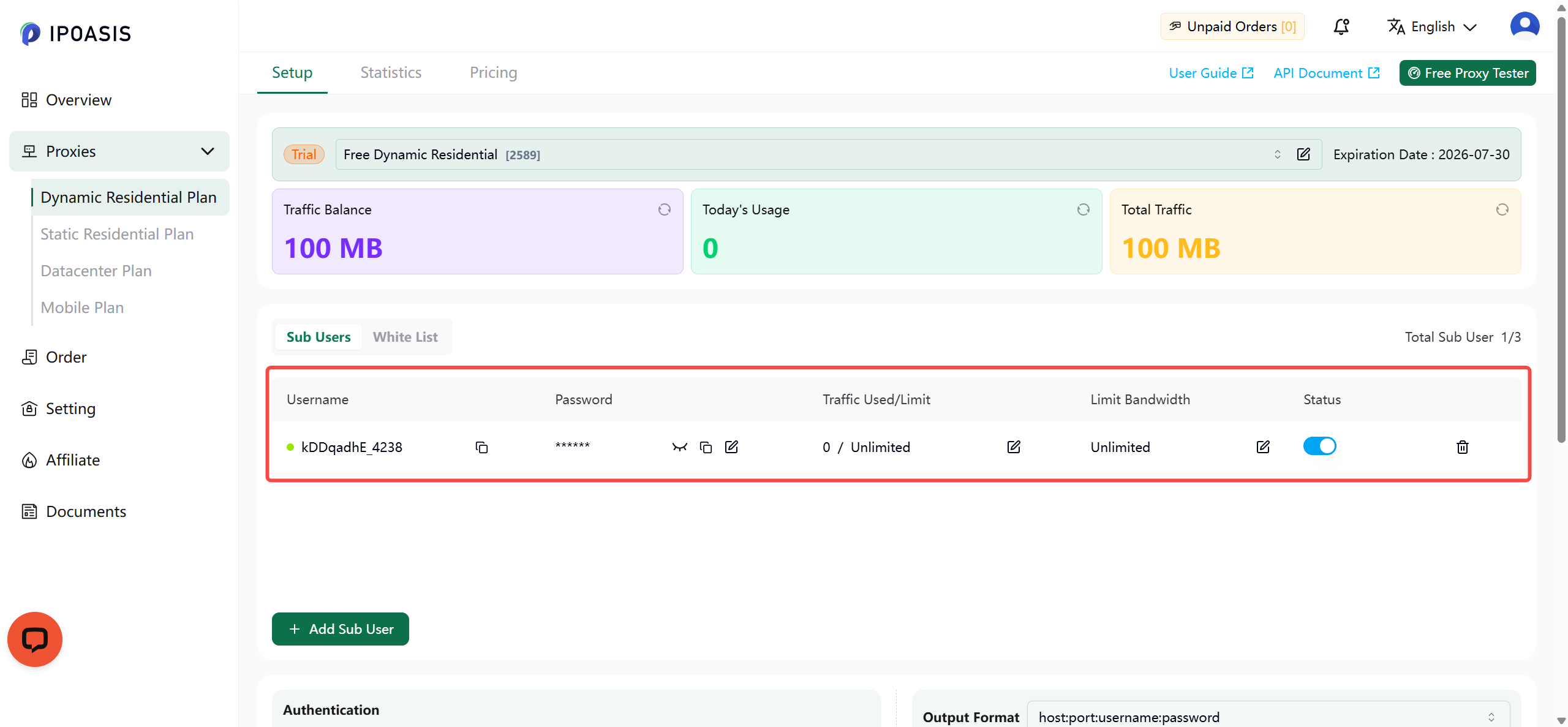
Step 3 Choose your region and session mode. Use the dashboard to pick the country you want and whether IPs should rotate (a fresh IP on each request) or stay sticky (one IP held for a few minutes). It builds these settings into your username for you — no editing by hand, no second endpoint to remember.
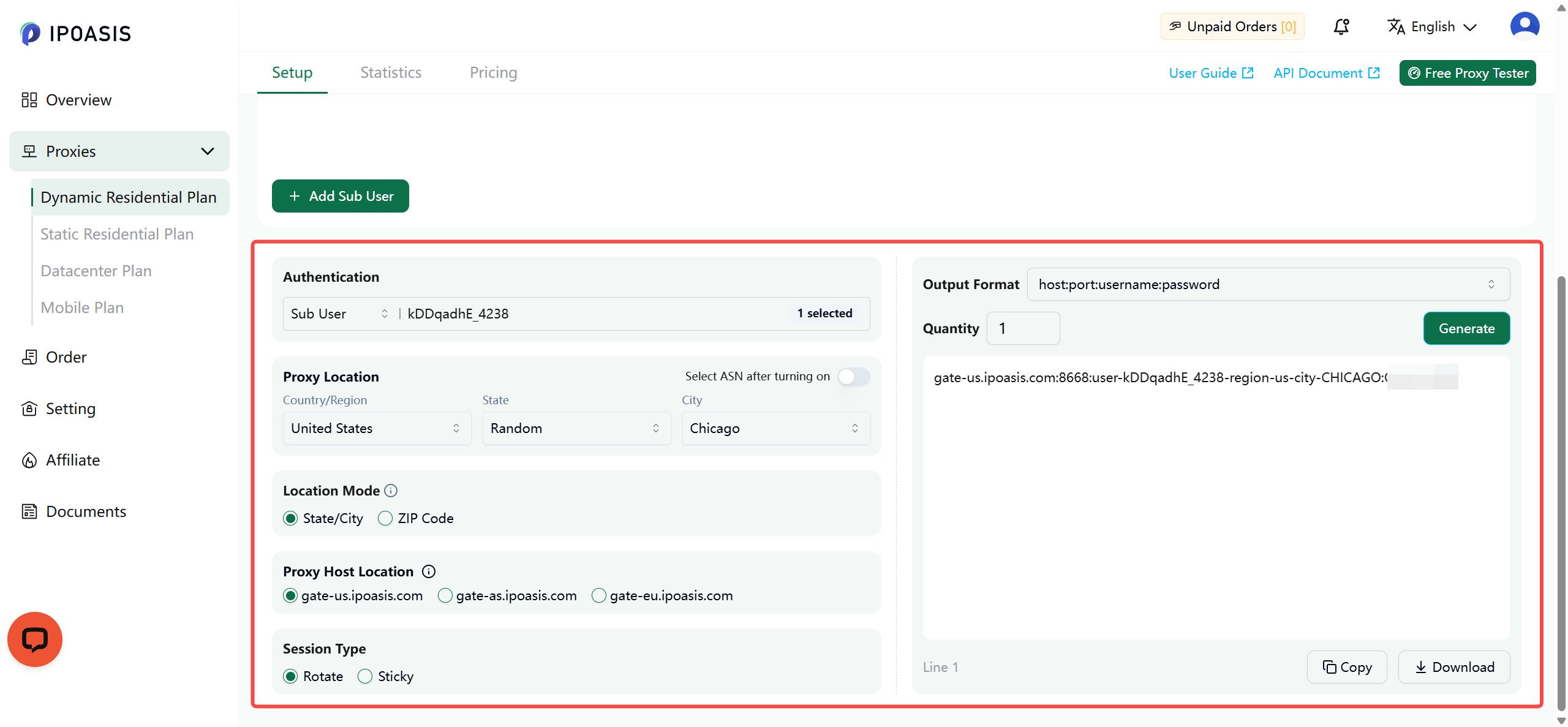
Step 4 Before running a real job, confirm your requests come out in the right place. IPOasis provides a free Proxy Checker tool that verifies your proxy is working and reports the exit IP and its location — so you can be sure it matches the region you chose.
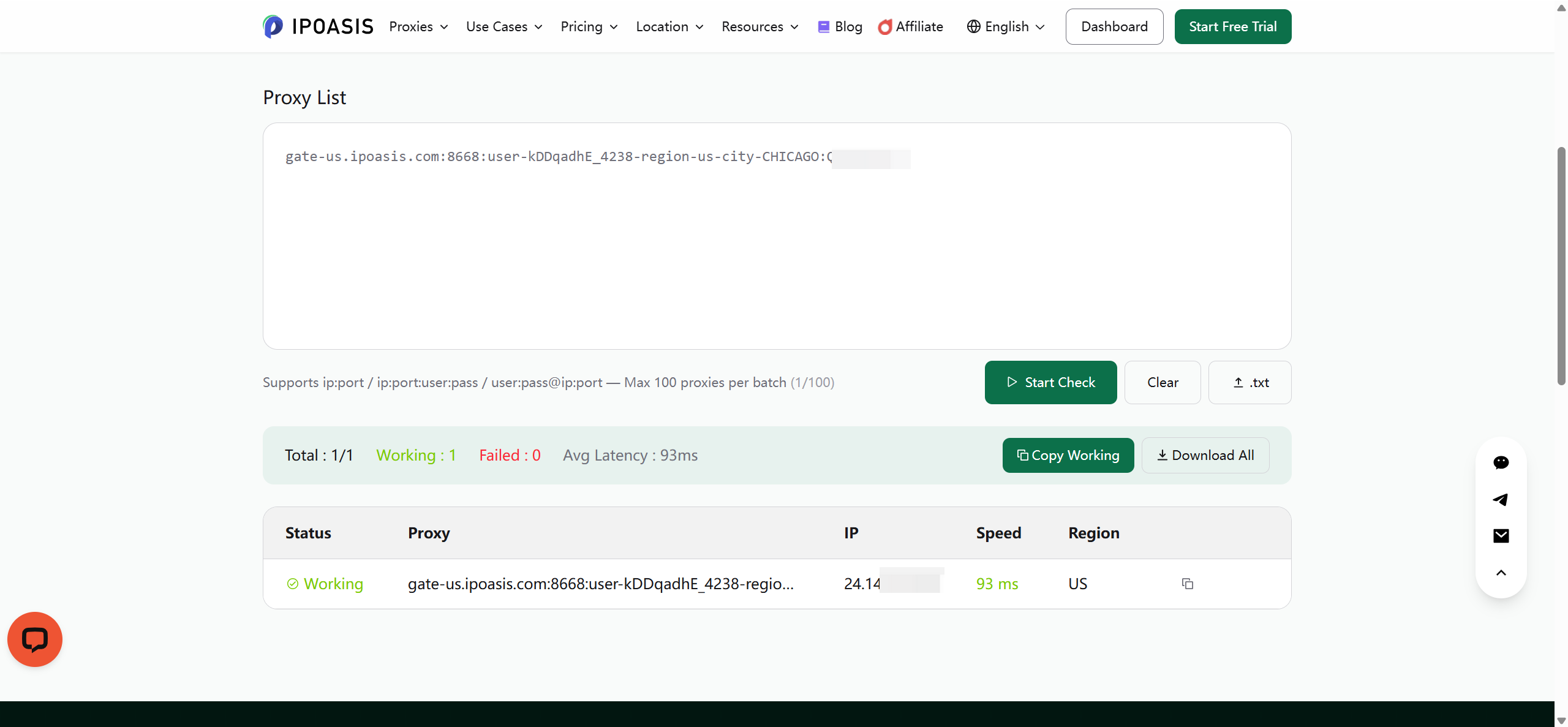
Step 5 Point your scraper at it. Paste the same four values — host, port, username, password — into your scraping tool's proxy settings. Every scraper and HTTP client has this field, so nothing else in your setup changes.
To move country or switch rotating↔sticky later, change the selection in the dashboard and reuse the new username — same host, same login, no new plan.
Conclusion
The best proxy for school and college research is the one that produces a clean, documented dataset without eating your budget — dynamic residential bandwidth, both session modes, real geographic coverage, and billing that forgives irregular academic timelines. IPOasis covers all of it: 80M+ IPs across 195 regions, rotating and sticky on one endpoint, sub-accounts for shared team bandwidth, flexible payment, and traffic that never expires. Get the session mode right, size your bandwidth from a quick pilot, and you have a collection setup you can actually stand behind in a write-up.
Start at ipoasis.com — create an account, run a small region test against your real target, and confirm the data comes back the way your project needs before you commit to a full collection run.
FAQ
Is it legal to use a proxy for a school project? Using a proxy is legal in most places — it's ordinary network infrastructure. What matters is what you collect and how: gathering public pages at a reasonable rate for a project is generally fine; collecting personal data without ethics approval is not. When you're unsure, your supervisor or research office is the right first call.
What's the difference between a proxy and a VPN? A VPN routes everything through one server on one IP — built for privacy on your end, not for collection. Every request still leaves from that single address, so a site rate-limits it exactly as it would your own connection. A proxy service is the opposite: IPOasis spreads your requests across 80M+ residential IPs in 195 regions, which is what lets you collect at volume and see a site as it renders in different markets. Different job entirely.
Do I need to be a programmer to use it? You need whatever tool already makes your requests — a Python script, a scraping framework, even a no-code crawler. IPOasis plugs in as standard proxy credentials (host, port, username, password): point your existing tool at the endpoint, and change one field in the username to switch region or session mode. There's nothing proprietary to learn.
Will a proxy make my crawler faster? Not per request — an extra hop adds latency. What it buys you is sustainable concurrency: twenty workers on twenty IPs instead of one worker rate-limited into uselessness.
Can I use free proxy lists? For anything you'll submit, no. Free proxies are unreliable, often log or alter traffic, and are already blocked by serious sites — and you can't document what they did to your data, so you can't defend the dataset. A term of IPOasis residential bandwidth often costs less than one textbook.