Cloudflare Error 1005: Your Proxy ASN Is Banned
Error 1005 means the site banned the autonomous system number (ASN) your IP sits in. Cloudflare returns it as HTTP 403. A new address from the same cloud network still fails, because the block covers the whole network. Read the body for the ASN line, then send the next request from a residential exit.
What error 1005 means
Error 1005 is Cloudflare’s “Access Denied: Autonomous System Number (ASN) banned.” Cloudflare’s 1005 page says the site operator banned that ASN from the website. The HTTP status is still 403. The four-digit code is what tells you the rule.
An ASN is the number registries give a network. Amazon, Google, a hosting company, and a home ISP each have one. The site owner adds that number to an access rule. Every IP announced from it gets the same page.
Cloudflare error 1005 is the same code with the vendor name in front. People also search a longer line, error 1005 you are being rate limited. That wording is a different Cloudflare code. 1005 is a network ban. A rate limit counts how often you hit the site.
If you do not run the site, Cloudflare will not lift the rule. Their visitor step is to send the owner a screenshot. A scraper cannot do that for every target. You can only change the network the request comes from.
How do you confirm it is 1005 and not another 403?
Confirm 1005 from the response body, not from the status alone. Status 403 only means refused. The body has to name the ASN ban. Save three things before you change anything.
- The HTTP status.
- The first lines of the body, including the Ray ID.
- The exit IP you used, and the ASN that IP belongs to.
A Ray ID is Cloudflare’s id for that one request. The site owner can look it up. You use it to prove which request failed.
Do not treat every 403 as 1005. A generic Cloudflare 403 can be a bot score, a browser check, or a hotlink rule. Those can clear on a slower retry. 1005 does not clear while you stay in the banned ASN.
Why does the same cloud network keep failing?
The same cloud network keeps failing because the ban is on the ASN, not on one address. Rotating to another IP inside Amazon, Google Cloud, or the same host still announces the banned number. The edge sees the network before it looks at your path or your headers.
Hosting ranges are easy to list. Site owners block them when scrapers and scanners share that network. A home ISP is a different ASN. A mobile carrier is another. The page does not care that your script is the same. It cares which network carried the packet.
Check the ASN before you buy a bigger pool in the same provider. Look up the exit IP, note the ASN, and compare it with a request that still gets the HTML. If both exits share an ASN and both return 1005, more addresses from that provider will not help.
What should you change on the next request?
Change the network, then retry one URL. Do not raise the thread count first. A banned ASN fails the 2nd request the same way it failed the 1st.
Use a rotating residential proxy so the exit is announced by a consumer ISP, not by the cloud host that just got banned. Pick the country you are allowed to collect in. Send one request. If the body is the product HTML, keep that setup and add the next URL. If the body is still 1005, that ISP’s ASN is on the list too. Switch country or switch to a mobile exit, which sits on a carrier ASN instead of a hosting ASN.
Keep one exit for one job. A product page, the variant call, and the price call belong on the same IP. Rotating every request on a banned network only produces more 1005 lines in the log. Rotating after a finished job is the right time to leave an ASN that starts failing.
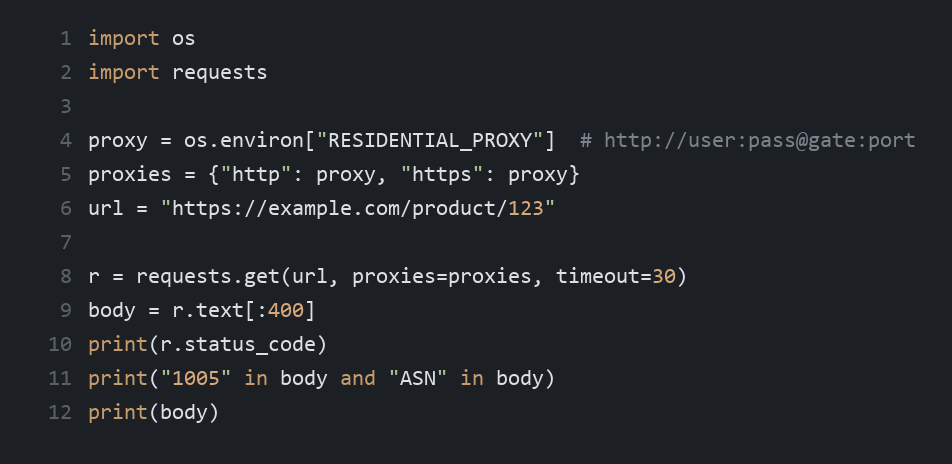
A 403 plus ASN in that slice means you are still inside a banned network. A 200 and product text means this exit is outside it. Log the exit IP next to the status so the next failure is comparable.
Price collection is the usual job behind this error. The same store returns 1005 from a server and 200 from a home ISP. Price monitoring needs that second network, or the daily file stays empty.
What if the new network is banned too?
If the new network is banned too, stop adding threads and record the ASN. Two residential exits in the same ISP can share one number. A second provider is a different test. A mobile carrier is a third.
Also fix the request shape once the network is clean. A banned ASN hides other problems. After you get one 200, keep the same headers and the same rate. A sudden jump back to hundreds of requests a minute can earn a fresh block on the new ASN.
When is error 1005 the wrong diagnosis?
Error 1005 is the wrong diagnosis when the body never says ASN. A 520 means Cloudflare reached the site and the site’s answer was unusable. Changing your proxy does not repair the origin. A 403 with no 1005 text can be a cookie, a WAF rule, or a challenge page.
Read the code in the HTML before you swap providers. If it is 1006, retire that one IP. If it is 1009, change country. If it is 1015, slow the crawl. Only 1005 means the whole ASN is on the list.
FAQ
What is Cloudflare error 1005?
Cloudflare error 1005 means the site banned the ASN your IP belongs to. The HTTP status is 403, and the page text says that autonomous system number is banned. The rule belongs to the site owner. Cloudflare will not remove it for a visitor, and a retry from the same network hits the same rule.
Does error 1005 go away if I retry?
No. A second request from the same ASN gets the same page, even if you wait. Rate limits cool down after you slow down. An ASN ban does not. The next request has to come from an IP announced by a different network, or the body will still say 1005.
Is error 1005 the same as “you are being rate limited”?
No. “You are being rate limited” is a different Cloudflare code, usually 1015. That one counts how many requests you sent in a short window. Error 1005 blocks every IP in a network, including a single test request. Waiting longer does not take an ASN off the list.
Will a new datacenter IP fix error 1005?
Only when the new IP is in a different ASN. Addresses from the same cloud account usually share one number, so the next host fails the same way. Look up the ASN of the old exit and the new exit. If the numbers match, you have not changed the thing the rule checks.
Should scrapers use a residential exit for error 1005?
Yes, when the banned ASN is a hosting provider. A residential exit is announced by a consumer ISP, which is a different number from the cloud host that returned 1005. IPOasis rotating residential exits are priced from $0.78/GB, and unused traffic does not expire. If that ISP is banned too, try another network or a mobile carrier.
What should I log when error 1005 appears?
Log the HTTP status, the Ray ID, the first lines of the body, the exit IP, and that IP’s ASN. Without the ASN you cannot tell a same-network retry from a real network change. One saved row is enough to compare the next test and decide whether to leave the provider.
Conclusion
Error 1005 is a site rule that bans one ASN, returned as HTTP 403. Another IP in that same network will fail again. Confirm the ASN line in the body, then retry a single URL from a residential or mobile exit and compare status, body, and exit IP.