Mobile Proxy vs Residential Proxy: Which Exit to Use
In a mobile proxy vs residential proxy choice, the split is the network on the exit. A mobile proxy leaves on a cellular carrier. A residential proxy leaves on a home ISP. Use the carrier exit for a mobile ad check, and the home-ISP exit for a public page job that needs more cities and a lower listed per-GB price.
What a mobile proxy is
A mobile proxy is a proxy whose exit address comes from a cellular network, usually 4G or 5G. The target site sees a carrier IP, the same class of address a phone uses on mobile data. It does not see your office broadband address.
A 4G proxy is that same carrier exit on a 4G radio network. 5G is the newer radio generation on the same carrier path. The label on the plan follows the generation. The job still needs a carrier exit rather than a home ISP exit.
Carriers often put many subscribers behind one public IPv4 address. RFC 6598 reserves 100.64.0.0/10, 4,194,304 addresses, as Shared Address Space for carrier-grade NAT. The shared block is how a provider numbers the link before the public address. The public address is what the target site records.
What a residential proxy is
A residential proxy is a proxy whose exit address comes from a fixed-line consumer ISP. Cable, fiber, and DSL are the usual access networks. The target site sees a home broadband IP, not a carrier IP and not a datacenter range.
That address is closer to one household than a carrier public IP usually is. A site that blocks one home IP does not have to block a whole mobile subscriber group to do it. A site that blocks a carrier public IP can hit many real phones at once, which is why some targets treat the two ranges differently.
The residential proxy in this comparison is the rotating kind used for public page jobs. One dedicated IP that must stay the same for days is a static ISP product. This page does not set that product up.
How do the two exits differ?
A mobile proxy vs residential proxy comparison is a comparison of exit networks. One request leaves on a carrier. The other leaves on a home ISP. Speed, city coverage, and the per-GB price follow from that network, and they change by provider.
Session length is a setting on the product you buy. 4G does not set it, and home broadband does not set it either. Read the session line on the plan you open, and keep that number with that plan.
Which job uses a mobile proxy?
A mobile proxy fits a job that needs the request to leave on a carrier network. The common case is a mobile ad check. The ad server should see a cellular exit, from a chosen country, the way a phone on mobile data would. App checks that filter for a mobile network are the same class of job.
A carrier exit costs more per gigabyte than a home ISP exit on the prices listed here, $0.88 against $0.78. That gap is why the carrier path stays on checks. A full catalog crawl belongs on the cheaper exit.
One check might be a single page view plus the creative request. A catalog job is thousands of page views. The smaller job can carry the higher rate. The larger job usually cannot, unless the target only answers on a carrier range.
- Confirm the target is scoring a carrier range, not a home ISP range. If a desktop residential exit already returns the fields you need, this job does not need the carrier path.
- Pick the country, and the city or carrier if the plan offers it. City coverage is narrower than on a large residential pool, so check the location list before you buy a pack.
- Keep one IP for that check. The next check starts a new session, so a later result is not tied to the first exit.
Open the mobile proxy product page when the check has to leave on 4G or 5G. Listed mobile traffic starts at $0.88/GB and carries no expiration date. Pay for the gigabytes the checks will use. A public catalog crawl is a different job, and it belongs on the residential side of this page.
Which job uses a residential proxy?
A residential proxy fits a public page job where a home ISP address is enough. Price monitoring, catalog checks, and SERP collection at volume sit here. You need more cities than a carrier list usually offers, and you pay by the gigabyte.
On a price-monitoring job, one session covers one product page. You store the visible price, the currency, and the availability. The next product starts a new session.
A home ISP exit is enough for that store when the page renders for a normal desktop visitor. The carrier exit stays in reserve for the store that only returns the price on a mobile network. Most catalog work never hits that case, so the residential pack is the one you size first.
Dynamic residential traffic is from $0.78/GB. Unused traffic does not expire, so a quiet week does not wipe the balance. On IPOasis dynamic residential, sticky lasts up to 120 minutes, then the IP can change. One product page keeps that session. The next product starts a new one.
The dynamic residential pricing page is the place to size the pack. If a logged-in account must keep one dedicated IP for days, that is a static ISP plan, same IP for that account. That plan is a third product. A longer mobile session does not turn a carrier exit into a dedicated login IP.
After a block, change the exit type only if the failed request was on the wrong network. A home ISP block does not by itself mean the next run must be cellular. The proxy choice after an IP ban walks through that split.
What does the request path look like?
The request path is the hop from your client to the proxy exit, then to the target. Your client never talks to the target directly. The target records the exit IP, so the path is what makes the two products different even when the client code is the same.
On a mobile proxy, that exit sits on a carrier network. On a residential proxy, that exit sits on a home ISP. The client code can be identical. You change the proxy URL, and the recorded IP changes with it. A wrong URL is the usual reason a carrier check still shows a broadband ASN.
Keep the path short on purpose. One job, one session, one exit. A retry on the same session stays on that exit, which is what you want when a page load fails halfway. A retry that opens a new session is a new exit, and the two results should be stored as separate checks.
How do you tell the exits apart on a request?
You tell the two exits apart by reading the IP the target records, then looking up the network that owns it. The vendor name on the invoice does not name that network. A carrier name supports the mobile column. A cable or fiber ISP name supports the residential column.
Send one request through each proxy, print the address, and look up the network that owns it. A carrier ASN on one line and a home ISP ASN on the other is the split in this comparison.
An ASN lookup is a whois or IP-to-network check on the printed address. You are reading the organization name. A name that matches a mobile carrier supports the mobile column. A name that matches a cable or fiber ISP supports the residential column.
If both lines show the same organization, the two proxy URLs are hitting the same exit. Swap one URL and run the snippet again before you compare jobs.
The snippet below uses placeholder proxy URLs. Replace them with the host, port, and credentials from the plan you bought. It does not include a real endpoint.
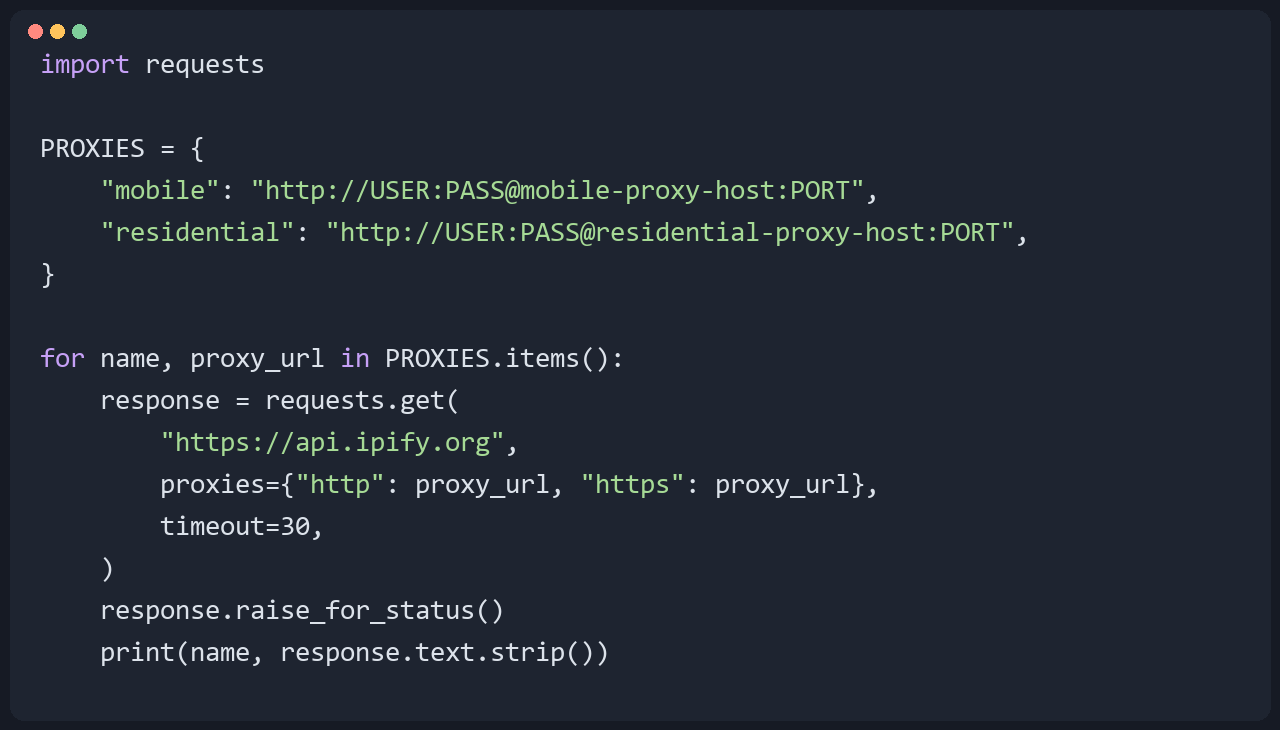
Expected output is two lines, each with a public IP:

Those two addresses are examples from the documentation range, not live exits. A timeout or a 407 means the proxy URL or the credentials are wrong. Fix that line and run it again. A 200 with an IP you can look up is the result you wanted.
FAQ
What is a mobile proxy?
A mobile proxy is a proxy that exits on a cellular carrier IP, usually over 4G or 5G. The target site records a carrier address, the same class a phone uses on mobile data. Many subscribers can share that public address because of carrier-grade NAT. You pick it when the job needs a carrier exit, such as a mobile ad check.
What is a residential proxy?
A residential proxy is a proxy that exits on a home ISP address from cable, fiber, or DSL. The target sees a household broadband IP. For public page jobs that need many cities, this is the usual exit. Dynamic residential traffic is listed from $0.78/GB, and unused traffic does not expire.
Is a 4G proxy the same as a mobile proxy?
A 4G proxy is a mobile proxy whose exit is on a 4G carrier network. A 5G exit is the same product type on a newer radio. Both are carrier exits. A home ISP exit is the residential column in the table above. Compare country, city, session length, and per-GB price. The generation number leaves the job match where it was.
Does a mobile proxy stay on one IP?
A mobile proxy can keep one IP for a single job, until that plan's session ends. Session length is a product setting. The carrier does not publish it. The next job starts a new session, so the two checks use separate exits. A dedicated IP for many days is a static ISP plan.
When is a residential proxy the better fit?
A residential proxy is the better fit when a home ISP address is enough and you need more cities or a lower listed per-GB price. Public catalog checks and SERP collection sit in that group. Dynamic residential traffic starts at $0.78/GB. Move to a mobile proxy when the target has to see a carrier exit, not because a residential request failed once.Pick the exit from the job. A carrier check goes to mobile, listed from $0.88/GB with no expiration date. A public page job goes to dynamic residential, listed from $0.78/GB, with unused traffic kept on the balance. Open the price page for the exit you actually need.